9.2.2 Create a Portlet Pointing to a WDA Application Via NWBC 
Log in to the IBM WebSphere Portal as administrator and choose Administration.
Select Web Clipping from the navigation bar on the left hand side (section Portlet Management) and choose New Portlet.
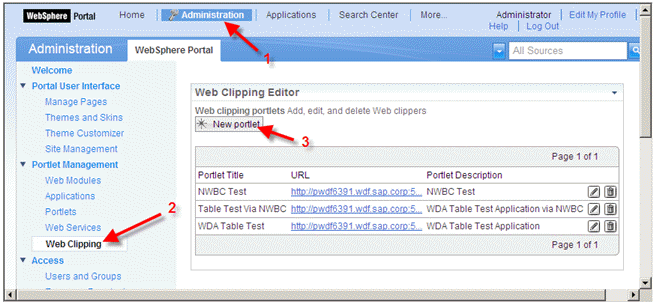 (New Portlet)
Enter a default name for the portlet, URL (as specified below) and a description for the portlet. After that choose Advanced Options.
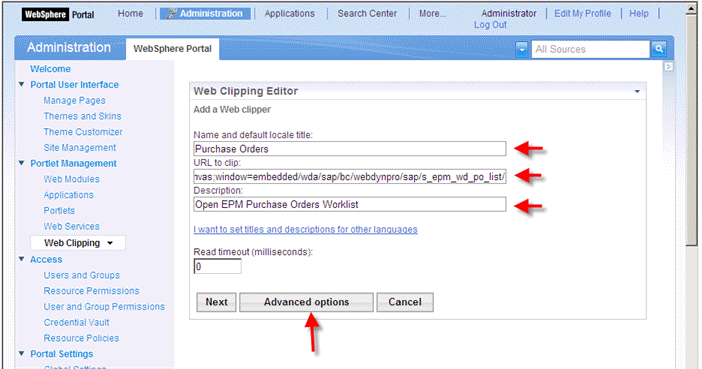 (Advanced
options)
(Advanced
options)The URL is specified as follows:
<protocol>://<ABAP host name>:<ABAP port>./sap/bc/nwbc/~canvas;window=<window type>/wda/<WDA application>/The following parts have to be replaced like this:
<protocol>
Protocol; either http or https.
<ABAP host name>
Host name of the ABAP system.
<ABAP port>
Port of the ABAP system for to the selected protocol.
<window type>
main
app
embedded
Window type can have one of the following values:
main shows full L-shape around the application
app shows only a small header around the application
embedded embeds the application without visible header
<WDA application>
Relative path to the WDA application.
To start the embedded EPM purchase order worklist you can use this link:
http://ldcibce.wdf.sap.corp:50000/sap/bc/nwbc/~canvas;window=embedded/wda/sap/s_epm_wd_po_list/Within the advanced options dialogue choose Modify display options.
 (Modify display options)
The Web Dynpro ABAP application has to be embedded within an IFrame. Select Inside an IFRAME on the portal page, set Width to 100 percent, Height to 600 pixels for example, select Allow the browser to access resources directly and choose OK.
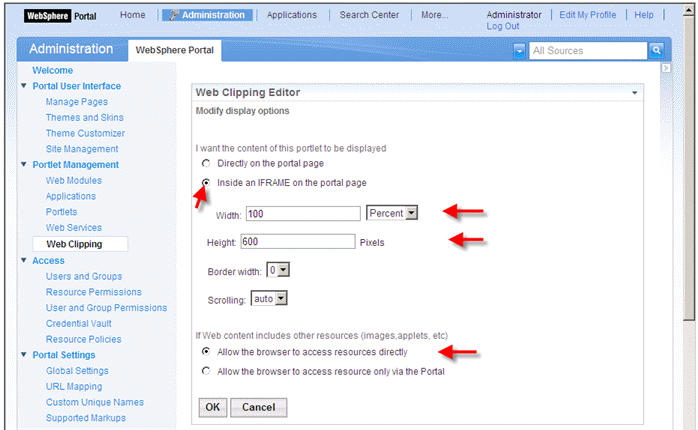 (Allow the browser to access resources directly)
Select Next and you will see a preview of your application.
Choose Finish.
 (Finish)