7.5 Configuring Authentication on the Server 
Authentication against an ABAP System
To access a Web application, AS ABAP uses the HTTP framework from the Internet Communication Manager (ICF), which provides functions for Defining the Logon Procedure.
A simple process is available for configuring the system logon (ICF system logon application). In addition, you can customize the logon information according to your needs, for example, system ID, client, language, system messages, logon and system information.
Important for NWBC is that all users must be dialog users which can be configured in transaction SU01. This is a prerequisite for NWBC to enable the HTTP framework to issue a logon ticket and to enable NWBC to display SAP GUI based transactions. For more information, see User Types and Logon Tickets.
With this, authentication against an ABAP system reduces to the normal authentication process as is standard for all Web-based applications on an ABAP stack, for example, BSP and Web Dynpro ABAP.
Settings for the Configuration for SSL support are particularly important for Security with AS ABAP. The logon ticket cache function is provided for increasing performance when there are multiple logons.
More information:
Authentication against a Portal System
The Business Client uses the Ticket Issuer to log on to the J2EE server. The logon must be property configured in the J2EE engine for this to work correctly.
Call the SAP NetWeaver Administrator.
Go to Configuration Management.
Choose Authentication.
Select the sap.com/tc~sec~sso~app*ticketissuer component.
Enter the following as the assigned login modules:
EvaluateTicketLoginModule
SUFFICIENT
ClientCertLoginModule
OPTIONAL
CreateTicketLoginModule
SUFFICIENT
BasicPasswordLoginModule
REQUISITE
CreateTicketLoginModule
OPTIONAL
This may appear as follows:
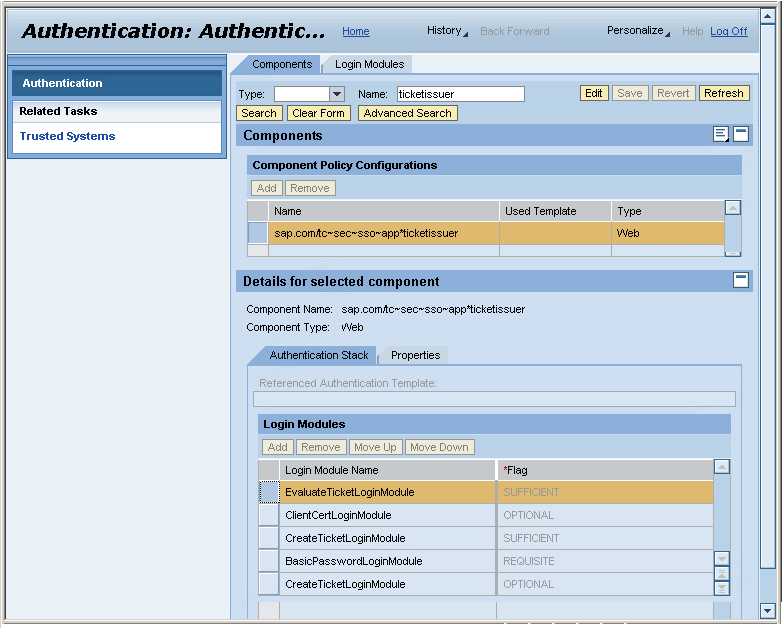 (Ticket Issuer)
More information: