7.3 Logon Tickets 
Single Sign-On (SSO) allows users to authenticate themselves once, and then log on to all of those systems that operate in the Single Sign-On environment without further intervention. This is based on the use of an HTTP cookie (MYSAPSSO2 cookie or logon ticket) which stores the user's identity.
Once the user has been authenticated, and if the server is so configured, it will set a logon ticket that is typically valid for the complete domain. The server can also be configured to set the cookie to be returned only to the specific server. Now, on all subsequent HTTP requests, the browser will send the cookie with the HTTP request. The targeted server then can use the information within the cookie as credentials to authenticate the user.
The SAP NetWeaver Business Client (NWBC) is a shell that is able to start different canvasses, based on different UI technologies, for example SAP GUI or HTML. Each of these canvas types has their own communication channel to the underlying server and needs authentication information to access the server. To pass authentication information in a secure fashion from the shell to the different canvas types, you must configure the server to use logon tickets (MYSAPSSO2 cookies). Logon tickets also enable the NWBC to start applications against multiple systems.
 Caution
The activation and correct configuration of logon tickets is an absolute prerequisite for using the NWBC against any server.
Testing Logon Tickets with a Browser
Log on to a test system with a browser. If logon tickets are incorrectly configured, the following error message appears, which means that there is still a configuration error.
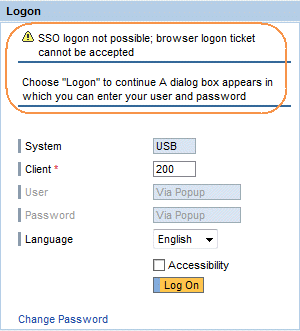 (SSO logon not possible; browser logon ticket cannot be accepted)
Testing Logon Tickets with the NWBC
Log on to a test system with the NWBC. The usual logon screen appears.
 (Example of NWBC logon dialog)
Enter your user name and password and choose Log On. If logon tickets are incorrectly configured, the following error message appears:
 (Example of NWBC SSO2 error message)