
 Planning the PAL Landscape

Definition
Before you can start using the Printing Assistant for Landscapes, you must define your PAL landscape which means that you have to decide which system shall be used as Central System and which systems shall be used as Target Systems. There can be several Target Systems, but there should be only one Central System. The Central System is the only system in your PAL landscape where you actually use transaction PAL.
Prerequisites
Each PAL Printer requires an associated output device as a source when you create it. Make sure that the output devices are available in the Spool Administration (transaction SPAD). This could be either in the Central System or in one of the Target Systems.

You cannot create output devices in PAL.
For general information about how to create and maintain output devices, read the SAP Printing Guide → Output Devices.
There are special requirements for some of the access methods supported with PAL. Read chapter Supported Access Methods for PAL for details.
Procedure
...
1. You decide which system in your system landscape should act as the Central System (see The Central System) and which systems you want to use as Target Systems (see The Target System).
2. Then you define your output devices as PAL Printers (Creating a PAL Printer) and put them together into Printer Groups (Creating a Printer Group). You can choose from the list of output devices created in the Spool Administration (transaction SPAD) in the Central System, and you can also retrieve output device information from the Target Systems.
All PAL Printer definitions are finally located in the Central System. PAL Printers can only be administered in the Central System. Modification or deletion of PAL Printers in a Target System is not possible.
3. Now you must form Target System Groups out of the Target Systems (Creating a Target System Group). Fig. 1 shows an example of how PAL looks like after the groups have been defined:
Fig. 1: Central System: Printer and Target System Groups in PAL

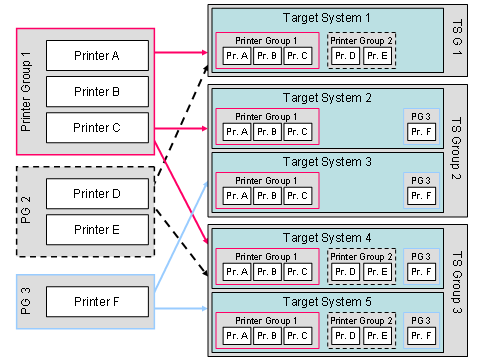
4. Now you can start distributing Printer Groups to Target System Groups (Distributing a Printer Group to a Target System Group). Distribution can take place between Printer Groups and Target System Groups, but not between single PAL Printers and Target Systems. You can distribute one Printer Group to several Target System Groups (see Fig. 2):
Fig. 2: Central System: Transaction PAL after distribution
Result
PAL Printer and Target System definitions are now available in transaction PAL. You have also defined Printer Groups and Target System Groups and distributed the Printer Groups to the Target System Group.