5 Role Maintenance in PFCG 
The Business Client enables information to be displayed on the client. The information is mapped to the client using the system role maintenance (transaction PFCG). For this purpose the PFCG, which is the central store for all system roles, has been enhanced with additional functions.
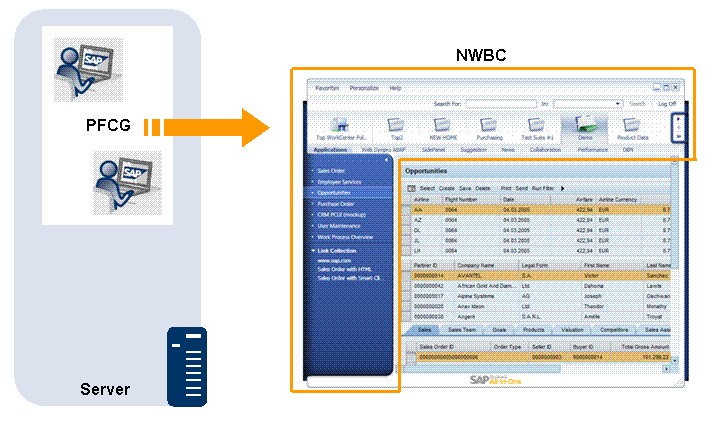
Mapping of PFCG Roles to the Business Client Structure
Information from role maintenance, including some enhancements, is used to set up the menu structure of the Business Client. Possible settings in PFCG are described in the following sections.
Introduces PFCG and its impact on NWBC. A short description of roles is given, the importance of user settings in SU01 is described, as well as the effects of roles on the easy access menu and the NWBC menu structure.
5.2 Improvements in PFCG User Interface
Lists the main differences in PFCG between SAP NetWeaver 7.00 SP21+ and 7.01 SP6+ versus SAP NetWeaver 7.02+ systems.
Provides information on role names, role short text and the Description tab
Describes specific additional menu options for very special use cases.
Explains the settings relevant for NWBC on the Menu tab
5.6 Default Pages and Service Maps
Expounds the two concepts of default pages and service maps which will cause the canvas area to be filled with content
Goes into detail about the flag Link Collection
Compares two-level navigation with single top level navigation
Introduces the function of additional menu entries as well as enhanced menu entries
Describes what to do if transactions contained in a role are to be started in a different system
5.11 Object-Based Navigation (OBN)
Explains the use of OBN for NWBC and how to set it up
More Information
For more information on the tools and function mentioned in the following sections, see:
User Administration Functions and Creating and Editing User Master Records
Maintaining Remote Destinations and Establishing a Connection Using a Destination (SM59)
Object-based navigation (OBN) documentation links: