CFG.01 Popup Dialog 'Logon to SAP System Failed' 
Symptom
NWBC is attempting to start a SAP GUI transaction and then displays an error dialog Logon to SAP System failed. The system description ‘XYZ’ cannot be found in the system list.
 (Logon to SAP System failed)
Solution
Within NWBC, there is a connection defined, that also in addition states that for SAP GUI connections, that the connection data from SAP GUI logon with the description ‘XYZ’ should be used for all SAP GUI connections started by NWBC. When this error message comes, there is no such SAP GUI connection defined with the matching description. In nearly all cases, it is recommended to not define this configuration string, but just to leave this field open. If the configuration string is defined, it must match directly a SAP GUI connection description. If this configuration field is empty (default recommended case), the connection data NWBC received from the server will also be used to start SAP GUI connections. This configuration field is only needed in very special cases where a special SAP GUI connection, for example via a SAP GUI router, is needed.
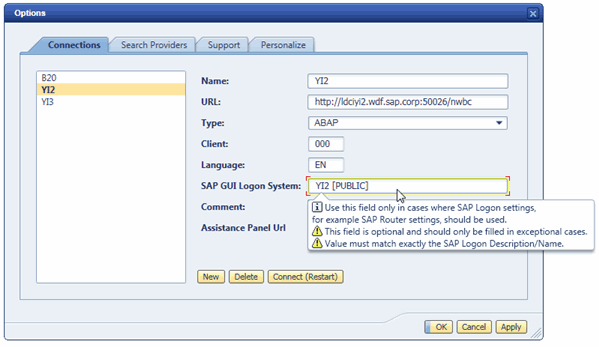 (SAP GUI Logon System)
For more detail information, refer to section 3.4.1 Configuring Connections.