
 Organizational Hierarchy

Definition
The organizational hierarchy represents the structure of the organizational units in your company for the purposes of internal controls.
Use
The organizational hierarchy stipulates how sign-off for the internal controls must occur. Sign-off occurs bottom-up (from the lowest to the highest level of the organizational hierarchy) and is performed by the managers for each organizational unit requiring sign-off.
The organizational hierarchy is first set up by the power user in the expert mode for structure setup . At least the root node of the structure must be created here and another organizational unit must be assigned. Once role assignment has been started by the power user (see Assigning Roles to Persons), the person assigned to the role containing the task Edit Organizational Hierarchy (EDIT-HIER) can edit the organizational hierarchy in the Web application Organizational Hierarchy.
For each organizational unit in the organizational hierarchy, you can copy processes and management controls from the central catalogs (see Settings for the Organizational Unit).
Structure
The organizational hierarchy is made up of organizational units. The root node represents the corporate group level. All other nodes of the hierarchy do not need to have fixed semantics. This means that you can construct your hierarchy using a mix of legal entities (such as subsidiaries) and business units (such as sales).
The following figure provides an example of an organizational hierarchy:
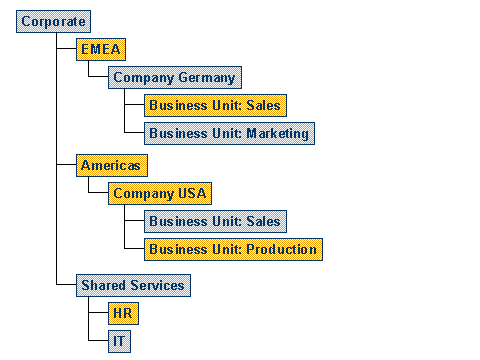
The assignment of the organizational units in the organizational hierarchy is time-based. This makes it possible to keep track of changes in the organizational hierarchy.
Organizational Unit
You can specify in the case of each individual organizational unit whether sign-off is required.
Role is a time-dependent attribute of the organizational unit. You can assign multiple roles to an organizational unit. When assigning roles to persons, you assign a person to the combination of organizational unit and role.
Integration
If data has erroneously been delivered in the organizational hierarchy in your system, you should first delete this data before going live. To do this, perform the IMG activity Structure Setup ® Delete HR Data Delivered by Mistake.
If you have already created your company’s organizational structure in the Organizational Management (BC-BMT-OM) component, you can use this structure as your organizational hierarchy in MIC. For more information, see Expert Mode for Structure Setup. If the organizational plan should not be visible in MIC, you explicitly mark just those hierarchies that you want to use in MIC. You do this in Customizing for MIC under Structure Setup ® Mark Organizational Hierarchy as Relevant for MIC.
If you already have an organizational hierarchy in a CSV file, you can upload it into the system. This applies to all central settings. For more information, see Uploading Central Settings.