
 Reversing the Payroll Result

Prerequisites
You have corrected the relevant master data.

If you reverse a payroll result that was the result of bonus accounting, you must also delete the relevant infotype record in the Additional Payment Off-Cycle infotype (0267).
You are in the Off-Cycle Workbench.
Procedure
...
1. Enter the personnel number that you want to process and choose the tab page Reverse payment.
2. Select the payroll result that you want to reverse.
3. If you want to reverse a check, enter the reason for the reversal.
4. Choose Reverse.
5. Confirm the security check.
Result
The system checks under which circumstances the reversal takes place:
· Have you reversed the last payroll result?
· Have payments already taken place to the third party?
· Had the payroll result already been posted to Accounting?
Depending on these circumstances, different subsequent activities are executed. The graphic below gives an overview of the subsequent activities:
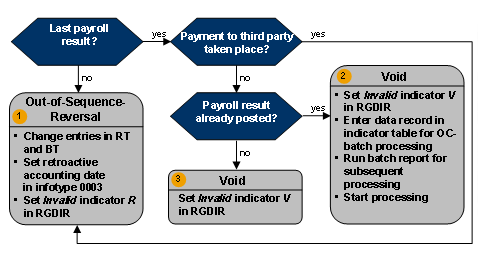
Result 1 – Out-of-Sequence-Reversal
...
1. The system makes changes to the tables RT (Results Table) and BT (Bank Transfers). For more information, see Effects of an Out-of-Sequence-Reversal.
2. Depending on how the reversed payroll result came about, the system sets the following retroactive accounting date in the Payroll Status infotype (0003):
¡ With an off-cycle payroll run, the system uses the payment date of the payroll as the date for the earliest payroll-relevant master data change for bonus payments.
¡ With a regular payroll run, the system uses the start date of the period for which payroll has been run as the date for the earliest change to master data since the last payroll run.
This ensures that retroactive accounting takes place.
3. The system places the indicator R in the invalid field of the payroll directory (RGDIR) for the reversed payroll result. It enters the reason, date and time of the reversal in this data record.
4. Following the reversal, you have the following options:
¡ If the employee is to receive a payment immediately, carry out a correction payroll run in the Off-Cycle Workbench.
¡ If you do not execute a correction payroll run in the Off-Cycle Workbench, the system automatically carries out retroactive payroll when the next regular payroll run takes place.
Result 2 – Void
...
1. The system places the indicator V in the Invalid field of the payroll directory (RGDIR) for the reversed payroll result.

If the V indicator is set, the payroll result can no longer be used for evaluations. Instead, it is only available for the payroll history. The system enters the reason, the date, and the time of the reversal to the data record.
2. The system makes an entry in the indicator table for off-cycle batch processing.
You can display the contents of the indicator table using report H99LT52OCG (Display Indicator Table for Off-Cycle Batch Processing). The report is located in the Off-Cycle menu.
3. The system runs the batch report for subsequent processing of off-cycle activities as a background job at the time that you have scheduled for the regular processing of the report.
The report reads the indicator table and starts a process based on the process model that you specified in the report variant. With this process, the system creates reversal documents for the reversed payroll results and transfers these to Accounting. As a result, the documents that were originally posted are reversed.
4. Depending on which payroll result you reversed, you have the following options:
¡ If the payroll result arose from an off-cycle payroll run, you can rerun payroll.
¡ If the payroll result arose from a regular payroll run, retroactive payroll takes place at the next regular payroll run, since the payroll control record already has the status End of payroll.
Result 3 – Void
The system places the indicator V in the Invalid field of the payroll directory (RGDIR) for the reversed payroll result.