
 Process Control

Use
SSR Process Control is a flexible tool that you use to identify and control business processes that are conducted within a retail network.
Service station partner invoicing, meter reading processing, and dip reading processing are examples of such processes.
Features
Process Definition
For each process, you can define:
· Check logic
· Execution logic
· Status update logic
· Application log settings
· Process prerequisites
Business add-ins are provided to allow you to define your own routines for process logic.
Process Assignment
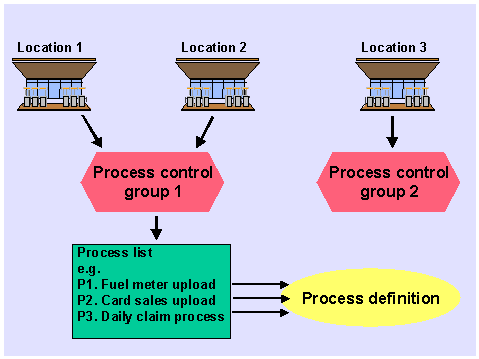
Processes are grouped into process control groups. By assigning a process control group to a location, you make the location relevant for the processes belonging to that group.
Status Update
Process status update. The system writes the current status of each process per Business Location (or Clearing House object) and date to the process status table. When the prerequisite process check runs, the system checks this status to determine whether prerequisite processes have completed successfully.
Application Log Update
The application log is updated to allow easy determination and reprocessing of errors.
Message Suppression
If you want to exclude specific system messages from the application log, you can specify which messages need not be included. You define message suppression for each process and company code combination.
Load Optimization
You can use remote function call functionality to distribute processing across several servers.
Activities
In Customizing for the Industry Solution Oil & Gas (Downstream) you:
· Define the objects to be processed by choosing SSR ® Process Control ® Maintain object types
· Define processes by choosing SSR ® Process Control ® Process definition
· Assign a retail network business type to each process by choosing SSR ® Process Control ® Assign business type to process ID
· Define process control groups by choosing SSR ® Process Control ® Maintain process control group
· Assign each process ID to the relevant process execution transaction by choosing SSR ® Process Control ® Assign process ID to transaction
· Maintain business add-ins for process logic by choosing SSR ® Process Control ® Maintain Business Add-Ins for Process Control
· Specify the processes that are allowed for each business location status by choosing SSR ® Business Location Master Data ® Business Location Attributes ® Define business location status codes
If you want to exclude system messages from the application log, choose SSR ® Process Control ® Define Message Suppression. You define message suppression for each process and company code combination. You can also suppress messages dynamically by creating a business add-in implementation for SSR ® Process Control ® Business Add-In for Message Suppression.
If you want to use load optimization, you:
· Assign server groups and define package size by choosing SSR ® Process Control ® Workload Optimizer ® Assign server group to process ID and define package size
· Activate load optimization by choosing SSR ® Process Control ® Workload Optimizer ® Activate Optimization
At the general (business location type) level of each business location master record you assign a:
· Process control group
· Location status