
 Background Processing
Use
Usually a company must manage a large volume of data in Sales. Due to a great number of incoming orders, an automatic processing within the logistical process is required. It is advantageous to externally carry out certain collective processing in times of low system utilization.
You can carry out both the allocation of stock as well as the subsequent changes of allocation results in the background. The background processing is not only a temporary bundling and removal of system activities, but it is also used as a control within the allocation run. By specifying the temporal sequence of the allocations, you can determine which requirements will be fulfilled first (Selection Set). In addition, you can subsequently select individual allocation results and change them once more in a collective processing (Reorganization).
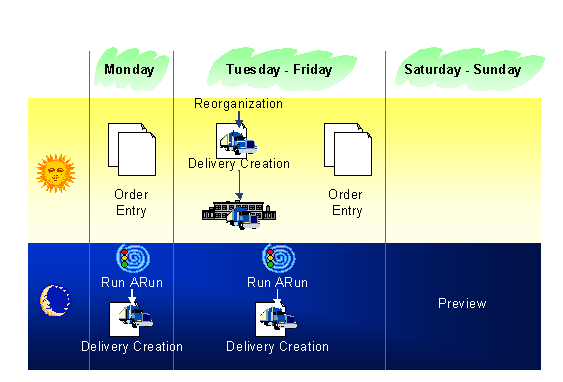
In the following example you can see one possibility of the temporal sequence of the individual steps in the sales order processing. The allocation run is always triggered at night. The individual customer requirements of the day are collected and can then be processed together. This guarantees that an overall examination of the requirement situation is carried out and the allocation is executed according to the selected strategy. On the next day you can filter certain allocations and, if necessary, they can be automatically changed. You can also start an allocation run in the preview mode using a background job.
Integration
During this procedure data is processed in the background while you carry out other functions on the screen. The background processes are not visible for the user. That means there is no dialog possibility. However, they have the same priority as online processes.
The background processing of allocation runs is carried out similarly to that of the R/3 Standard. To plan a background job, the system requires the name of the program to be executed and a variant that contains the selected program parameters for the requested run. You cannot plan allocation runs as background jobs directly. You can create a variant for the program, but the selection conditions for the requirements must always be entered manually. Otherwise the system would not know which requirements should be selected. Using the selection set the allocation runs are integrated in the background processing. Here you can store the rules for the requirements selection in a selection variant, which is automatically called when starting the program. If you want to change or reexplode certain allocations, you must do that in the online mode with the aid of the ARun Optimizer. For this you need to use the Reorganization in the background processing.
As the processing of a large data quantity by the allocation run can significantly affect the system performance, you should always choose job class A. This guarantees that the planning of an allocation run is considered with the highest priority by the system.
Prerequisites
The name of the program to be executed (with a related variant that contains the corresponding parameters) is required to implement the background processing. The programs Selection Set (/AFS/ARUN_BATCH) and Reorganization (/AFS/ARUN_MANAGEMENTTOOL_BATCH) are available for the execution of the allocation run. That means that you must create the corresponding variants before the job can be started.
In addition, you must completely maintain the parameters of the allocation run type or ARun Optimizer type.
Features
You can trigger the background processing for each mode of the allocation run. You can plan a job via the selection set in the normal, simulation, and preview modes. The functions of the ARun Optimizer can be executed in the background and can be used exclusively via the functionReorganization.
Activities
Implement the required background processing with the SAP job management. To do this you can use the programs Selection Set and Reorganization. Define the program parameters in the related variant.