Document Item: Multi-Store Order (Segment
E1J3AIO)
Document Item: Multi-Store Order (Segment
E1J3AIO) 
Mandatory segment: NO
Superior segment: E1J3P01
Field |
Short text |
Explanation |
J_3APARVW |
Partner function |
Partner function of the ship-to party |
J_3ASTORE |
MSO stores |
Partner number of the ship-to party |
J_3ADICE |
Customer distribution center |
Identification number of the customer distribution center |
J_3AWMENG |
Schedule line quantity |
Ordered quantity |
J_3ABMENG |
Delivered quantity in sales unit |
No processing |
J_3ADEPM |
Department |
Department number (is transferred to the document) |
J_3ASTCU |
Customer store / distribution center number |
Identification of the store / the customer distribution center at the customer |
J_3ABSTNK |
Order number of customer |
Order number of customer |
J_3AILNNR |
70 Character field |
International Location Number of the store |
J_3AUPDKZ |
Update Indicator |
No processing |
With the segment E1J3AIO the necessary data for the creation of MSOs is transferred to the document. Using the specification of the partner function it is controlled whether the store itself is the ship-to party or if the delivery first goes to a customer distribution center. If the store itself is the ship-to party, use the partner function WE for the ship-to party. The partner number that was maintained in the system as the ship-to party is to be transferred in the field J_3ASTORE.
If this field is not filled, you can trigger a conversion of the partner number from the specifications for the International Location Number (J_3AILNNR) (see also segment E1EDKA3).
The customer store number can be transferred in the field J_3ASTCU. If this number is maintained in the AFS additional data for the customer master, it will be converted into a valid partner number. The original customer store number is then transferred to the document.
For further documentation of MSOs, please see the information in Multi-Store Orders.
The quantity (J_3AWMENG) transferred in this segment is assigned to the respective store as the ordered quantity. Take note that the quantity specification in segment E1EDP20 is not included in this case.
The segment can occur multiply under an E1J3P01-segment, depending on the number of stores that order the product described under this item. All further specifications in sub-segments are then valid for all stores respectively.
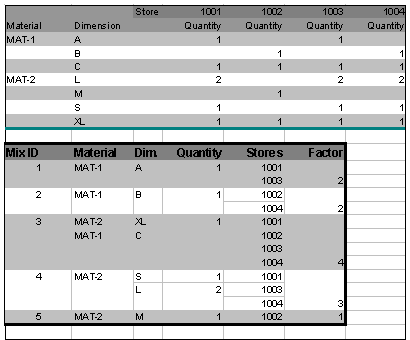
The system assigns a mix ID for a group of stores (exception: in segment E1J3AHO the indicator J_3AMSOFLG has been set). With the automatic assignment of the mix ID, a numerical numerator is used. This means that a maximum of 999 mix IDs can be assigned. The stores are grouped according to the number of the same combinations of stores that order the same combination of dimensions and quantities for the same date. The following graphic illustrates the logic for the automatic generation of the mix IDs.
Example of Mix ID assignments in MSOs