 Inbound Message Processing for SAP SNC
Purpose
The process described below gives an overview of how the Supply Network Collaboration (SAP SNC) receives and displays XML messages.

Whenever you use the business scenario
Responsive Replenishment
, inbound message processing performs additional checks and tasks. For more information, see under
Inbound Message Processing for Responsive Replenishment
.
Prerequisites
You have already made the necessary settings in Customizing for
Supply Network Collaboration
under
Basic Settings
→
Processing Inbound and Outbound Messages
Process
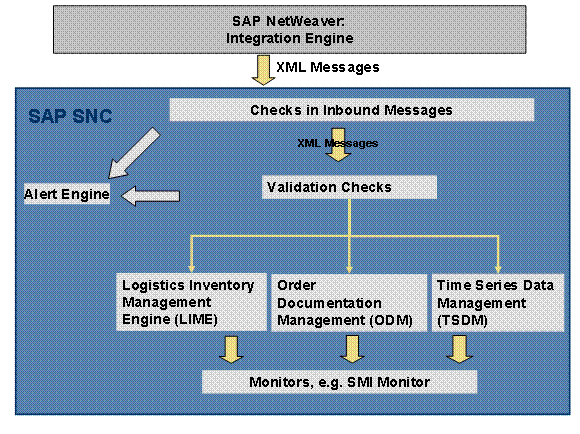
Message Transfer to SAP NetWeaver
You transfer messages, for example with information about sales and stock figures, from your backend system to SAP NetWeaver. If you use an SAP backend system, you can use special reports for Supplier-Managed Inventory, Release Processing, and Supply Network Inventory. For more information, see the following:
Transferring Demand and Stock Data to SAP SNC (SMI, RP, DR) (Supplier-Managed Inventory, Release Processing)
Data Transfer for Contract Manufacturing (Supply Network Inventory)
Data Transfer for Contract Manufacturing: New Reports sapurl_link_0029_0004_0007(Supply Network Inventory)
Transfer of XML Message to SAP SNC
SAP NetWeaver converts inbound IDocs to XML messages. SAP NetWeaver transmits XML messages to SAP SNC.
Determining the Process Type for the XML Message
For each XML message, SAP SNC determines the corresponding process type that you have defined in Customizing for
Supply Network Collaboration
under
Basic Settings
→
Processing Inbound and Outbound Message
→
Process Types for Inbound Messages
. Depending on the process type and the type of XML message, SAP SNC performs validation checks for an XML message.
For more information, see the Implementation Guide (IMG) for
Supply Network Collaboration
.
Checks in Inbound Message Processing and Master Data Completion
SAP SNC checks all inbound XML messages for consistency and completeness. These checks run automatically. For more information see Checks in Inbound Message Processing .
SAP SNC can fill in some master data if it is missing in inbound XML messages. For more information, see Master Data Completion .
Validation Checks
You can set validation checks for XML messages in addition to the checks in inbound message processing. For more information, see Validation .
Alert Generation
Depending on the results of the validation checks, SAP SNC either saves the data in application tables or rejects it. If the system generates error messages of type A (Abort) or E (Error) during the validation checks, it either creates error messages in the application log or alerts, depending on the Customizing settings.
You can restrict logging in the application log in Customizing for
Supply Network Collaboration
under
Basic Settings
→
Processing Inbound and Outbound Messages
→
Restrict Log
.
You can limit alerts in Customizing for
Supply Network Collaboration
under
Basic Settings
→
Processing Inbound and Outbound Messages
→
Restrict Alerts
.
Posting Data on the Database
The system posts data without error messages in the following components in the database:
Time series: Time Series Data Management (TSDM)
Order documents: Order Document Management (ODM)
Stock data: Logistics Inventory Management Engine (LIME)
Results
You use the data for collaborating with suppliers, for example your supplier can see the key figures for SMI in the SMI Monitor.