 Inbound Message Processing for Responsive Replenishment
Purpose
The following process gives you an overview of how SAP Supply Network Collaboration (SAP SNC) receives customer XML messages for
Responsive Replenishment
and how it prepares them for replenishment planning.
Prerequisites
You have already made the necessary settings in Customizing for
Supply Network Collaboration
under

Basic Settings

Processing Inbound and Outbound Messages
 .
.
Process
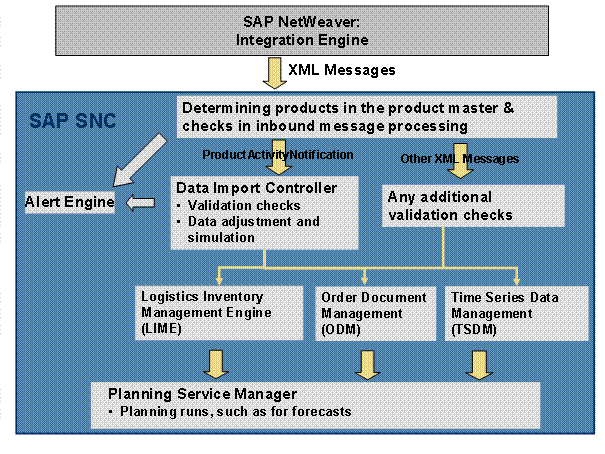
Message Transfer to SAP NetWeaver
The customer transfers messages, for example with information about demand and stock data, to the SAP NetWeaver system.
Transfer of XML Message to SAP SNC
The SAP NetWeaver system converts the messages into XML messages and transfers them to SAP SNC.
Determination of Product in Product Master
On the basis of the partner-dependent product IDs or the standard product IDs, such as the International Article Number (EAN) or the Global Trade Item Number that the customer transferred, SAP SNC determines the corresponding product in the product master of SAP SNC. For more information, see Use of Partner-Dependent Product IDs and Standard Product IDs .
Determining the Location Product Status
SAP SNC also determines the location product status that defines whether the transferred data is also relevant for planning and forecasting.
Determining the Process Type for the XML Message
For each XML message, SAP SNC determines the corresponding process type that you have defined in Customizing for
Supply Network Collaboration
under Basic Settings
Processing Inbound and Outbound Messages
Process Types for Inbound Messages
. Depending on the process type, SAP SNC performs validation checks for an XML message.
For more information, see the Implementation Guide (IMG).
Checks in Inbound Message Processing and Master Data Completion
SAP SNC checks all inbound XML messages for consistency and completeness. For more information see Checks in Inbound Message Processing .
SAP SNC can fill in some master data if it is missing in inbound XML messages. For more information, see Master Data Completion .
Data Import Controller and Validation Checks
You can use the following additional tools for checking and correcting XML messages:
You can correct transferred purchase order numbers for XML messages of type
OrderIDAssignmentNotification
.For more information, see Processing of Number Range Interval Errors .
For XML messages of type
ProductActivityNotification
, the Data Import Controller performs various data clean-ups, adjustments, and validation checks.Other XML messages also go through validation checks. For more information, see Validation Checks .
Alert Generation
Depending on the results of the validation checks, the Data Import Controller either saves the data in application tables or rejects it. If the system generates error messages of type A (abort) or E (error) during the validation checks, it creates alerts that you can see in the Alert Monitor .
 Note
NoteIn Customizing for
Supply Network Collaboration
, you can define whether and which errors SAP SNC should log in the application log and when it should generate alerts. To do so, choose Basic Settings
Processing Inbound and Outbound Messages
Restrict Log
and
Restrict Alerts
.End of the note.Posting Data on the Database
The system posts the data without error messages and adjusted and cleaned-up data from the Data Import Controller in the following components on the database:
Time Series Data Management (TSDM)
Logistics Inventory Management Engine (LIME)
Results
You can now use the data for a planning run in the Planning Service Manager (PSM).