Assignment of Production Resources
Use
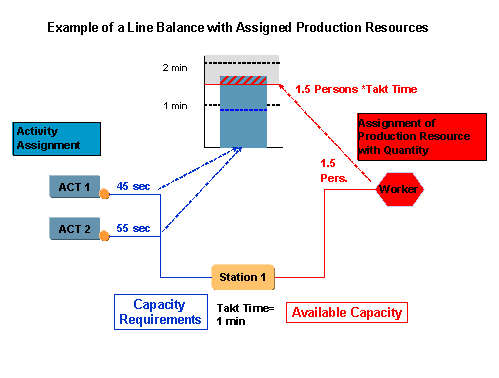
In line balancing, you can assign production resources to line elements to depict the available capacity. The system uses the following formula to calculate the capacity available at a line element to which you have assigned a production resource: “Takt time x number of assigned production resources”
 Caution
There is currently no connection between production resources that you enter in the mode of the line activities and production resources that you assign to a line element. Production resources that you assign to a line element are not connected to the mode of a line activity. For this reason, it is not absolutely necessary to enter a production resource in the mode of a line activity. Only the duration that you have maintained in the mode is relevant for the line balance.
You can assign production resources of type “worker” or of type “operating facility”. These could be important machines or production resources/tools, for example, whose procurement you need to plan and control. You can adjust the capacity available at a line element by setting the number of production resources accordingly.
Integration
In the DI System, the system uses the theoretical model mix that you have created for the line balance to check the available capacity and capacity requirements (
work content
) at a line element. In SAP APO, you can use the actual production program for this check. You can use the report for
Displaying the Capacity Utilization
in SAP APO. For more information, see the SAP APO documentation on
Production Planning with the Rapid Planning Matrix
.
Prerequisites
You have created the line structure.
You have created a line balance and a model mix.
You have already assigned the activities, or at least stated whether you wish to assign the line activities to the line segments or to the work areas. This is necessary because you must assign the production resources to the same line elements as the line activities.
When you work in the navigation tree directly with the line structure and not with the
line balance,
you must create afilter
and enter the line balance in the filter.
Features
Within a line balance, you can assign production resources to the line elements in the following ways:
You can enter the production resources manually on the
Production Resources
tab page for a line element. In theNumber
field, enter the number of production resources. When you have assigned the line activities, you can increase the number of production resources in theNumber
field if you realize that the work content cannot be completed in the time available at this line element.You can assign production resources using the automatic assignment function.
Example
The following graphic shows how the available capacity is calculated from the assigned production resources. The predefined available capacity is too low in this example. You can change it by entering
2 Workers
on the
Production Resources
tab page for the line element.