 Collaborative Transportation Planning
Purpose
Collaborative transportation planning allows manufacturers and their transportation service providers (carriers or forwarders, for example) to streamline their work processes and ultimately benefit from reduced handling costs, improved transparency, and greater efficiency.
Manufacturers inform their transportation service providers about scheduling agreements.The transportation service provider can accept, reject, or change the transportation RFQs.For instance, the TSP can suggest an alternative pickup or delivery date.
You can use EDI or the Internet for collaborative transportation planning.
Collaborative Transportation Planning with EDI
Prerequisites
You have defined the partner profiles for an EDI partner of typeCR(
Tools
→
Business Communication
→
IDoc Basis
→
Administration
→
Partner profile
).
Depending on the scenario, you have maintained message typePLNSHPhere for the outbound and inbound parameters.

You can choose any partner number.
For more information, see IDoc Interface/Electronic Data Interchange .
You have assigned this EDI partner to your transportation service provider.
To do this, access the location master of the transportation service provider with location type1020and complete the EDI partner number details on the
General
tab page.
You have created the VS alert profile .
You have carried out the planning in the SAP APO Transportation Planning and Vehicle Scheduling (TP/VS) component and created planned shipments.
Process Flow
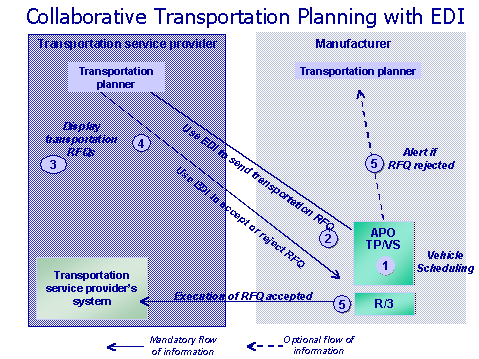
The transportation planner at the manufacturer’s plant plans in TP/VS and chooses a transportation service provider either manually or automatically.
If this planner releases shipments in TP/VS, the system sends a transportation RFQ to the transportation service provider automatically using EDI (IDOC PLNSHP).
The transportation planner at the transportation service provider then uses EDI to accept or reject the transportation RFQ.He or she can also change the pickup or delivery dates and times set out in the transportation RFQ (that is, quote different ones).
If the transportation RFQ is rejected or changed, the transportation planner at the manufacturer receives notification through the SAP APO Alert Monitor.If it was rejected, he or she can invite tenders for new shipments or cancel shipment tendering.
If the transportation RFQ was accepted, the transportation planner at the manufacturer’s plant can continue planning in TP/VS. Finally, the planned shipments are transferred to the SAP R/3 execution system where they become actual shipments.
Collaborative Transportation Planning with the Internet
Prerequisites
You have defined collaboration partners for your transportation service providers in theTransportation planningcollaboration scenario (
Supply Chain Collaboration
→
Environment
→
Current Settings
→
Collaboration Partner
s).
For more information, see Maintaining Settings for Collaborative Partners
You have assigned a collaboration partner to the transportation service provider (in master data).
To do this, access the location master of the transportation service provider with location type1020and complete the collaboration partner details on the
General
tab page.
You have followed this menu path and entered your e-mail address (on the
Address
tab page):
Tools
→
Administration
→
User Maintenance
→
Users
You have created the VS alert profile .
You have carried out the planning in the SAP APO Transportation Planning and Vehicle Scheduling (TP/VS) component and created planned shipments.
Process Flow
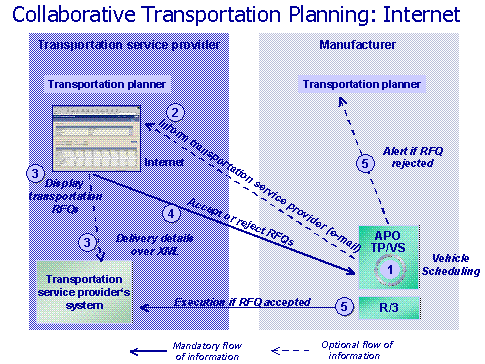
The transportation planner at the manufacturer’s plant plans in TP/VS and chooses a transportation service provider either manually or automatically.
If this planner wishes to send e-mails to the transportation service providers, he or she has to select the
Sending of E-Mails Activated
indicator in the communication settings for the collaboration partner.
The transportation planner can also revoke transportation RFQs.To do this, he or she has to cancel the release of the relevant shipments.In this case, the transportation service providers involved receive a list of revoked transportation RFQs by e-mail.
The TSP’s transportation planner reviews the transportation RFQ on the Internet and either accepts or rejects it.If necessary, he or she can change the pickup or delivery dates and times set out in the transportation RFQ (that is, quote different ones).Furthermore, he or she can view an XML file containing all the details of the transportation RFQ by clicking on the shipment number.The XML file can be displayed in a transportation service provider-specific layout that is defined in the APO CLP partner settings.
If you wish to provide your transportation service providers with an XML file, you must select the
XML Display Activated
indicator in the communication settings for the collaboration partner.You also need to edit the EDI settings.
If the transportation planner rejects or modifies the transportation RFQ , the transportation planner at the manufacturer receives notification through the SAP APO Alert Monitor.If the shipment was rejected, he or she can invite tenders for new shipments or cancel shipment tendering.
If the transportation RFQ was accepted, the transportation planner at the manufacturer’s plant can continue planning in TP/VS. Finally, the planned shipments are transferred to the SAP R/3 execution system where they become actual shipments.
User Parameters for Collaborative Transportation Planning
Description |
Prerequisite |
|---|---|
You wish to dispatch a shipment.For this purpose, you wish to send the IDocPLNSHPdirectly from within TP/VS (/SAPAPO/VS01) instead of through the function
|
Enter the following data on the
Parameter/sapapo/clp_vsidoc, valueX |
You wish to prevent the details about planned shipments from being changed on the Internet. |
Enter the following data on the
Parameter/sapapo/clp_bidnochg, valueX |
You do not want the transportation service provider to have access to the details of the planned shipments. |
Enter the following data on the
Parameter/sapapo/clp_bidnodtl, valueX |
You do not want to display certain data about the planned shipments on the Internet. |
Enter the following data on the
Parameter/sapapo/clp_bidnofld Value'X ' (first character) The
Value' X ' (second character) The
Value' X ' (third character) The
Value' X ' (fourth character) The
Value' X ' (fifth character) The
Value' X ' (sixth character) The
Value' X ' (seventh character) The
Value' X' (eighth character) The
You can also combine these parameter values.For example, if you wish to prevent the
|