 Forecast Errors
For
automatic model selection
in Service Parts Planning (SPP), the forecast errors described below are available. Specify in the forecast profile on the
Model Selection
tab page in the
Forecast Error in Automatic Model Selection
field which of these forecast errors you want to work with. You get to the forecast profile from the
SAP Easy Access
screen under

Service Parts Planning (SPP)

Planning
Forecasting
Forecast Profile
 .
.
Calculation of Forecast Errors
n
specifies the number of periods over which the system calculates the standard deviation. You define this parameter dependent on model in the forecast profile on the
Model Parameter
tab page. For more information, see
Calculation of Standard Deviation
.
For each forecast model in the forecast profile, you can specify which historical analysis period the system should consider, as described in the following table:
Forecast Model |
Historical Analysis Period |
|---|---|
First-order exponential smoothing |
Details in field
|
Second-order exponential smoothing |
Details in field
|
Moving average |
Details in field
|
Linear regression model |
Details in field
|
Intermittent forecast model |
Details in field
|
Declining demand forecast (DDF) |
Details in field
|
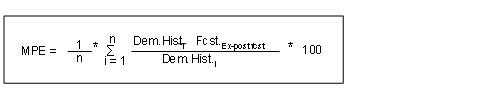
Mean Percentage Error (MPE)
The system calculates the mean percent error using the following formula:
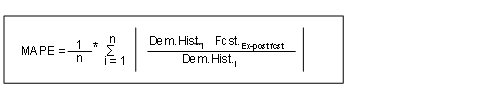
Mean Absolute Percentage Error (MAPE)
The system calculates the mean absolute percent error using the following formula:
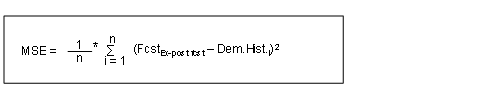
Mean Square Error (MSE)
The system calculates the mean square error using the following formula:
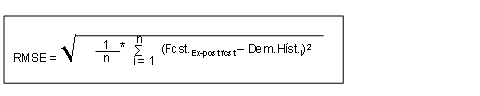
Root of the Mean Square Error (RMSE)
The system calculates the root of the mean square error using the following formula:
Customer-Defined Forecast Error
In addition to the forecast errors described above that are delivered by us, you can also work with your own forecast errors. In this instance, you must implement the Business Add-In (BAdI)
BAdI: Define Customer's Own Forecast Errors
(/SAPAPO/BADI_FCST_ERROR).
For more information, see the Implementation Guide (IMG) forAdvanced Planning and OptimizationunderSupply Chain Planning
Service Parts Planning (SPP)
Business Add-Ins for Service Parts Planning (SPP)
BAdIs for Forecasting
BadI: Determine Customer-Defined Forecast Errors.
Displaying Forecast Errors
You can view the forecast error that the system has calculated on the
Interactive Forecasting
screen in the
Demand: Forecast Error: AMS
key figure.
You get to the
Interactive Forecasting
screen on the
SAP Easy Access
screen under
Advanced Planning and Optimization
Service Parts Planning (SPP)
Planning
Forecasting
.