 Printing Reports
Use
You can print reports using either:
the system or
Microsoft Word for Windows
When you print directly from the system, you can define the print layout yourself and print the entire report. When you print from Word for Windows, you have the option of modifying the layout manually in Word.
Features
The following table shows when you would normally want to print with which option:

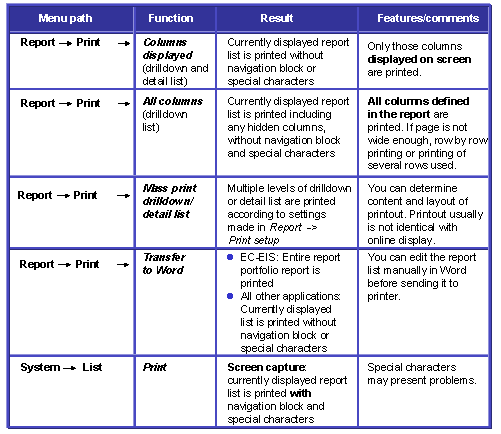
The different printout options differ in how the columns are built and what is contained. What options you have for printing depends on where you are in the report. The following table shows you what printing options you have and how they differ:
 Note
Note
The settings that you make with

Report

Print setup
 determine how the report is printed using
Report
Print
. They have no influence on printouts created using
System
List
.
Activities
To print from the system, choose
Report
Print
. To print from
Microsoft Word for Windows, choose Report
Export
. Then choose
Transfer to Word
.