Assigning Short Names

Assigning Short Names
Use
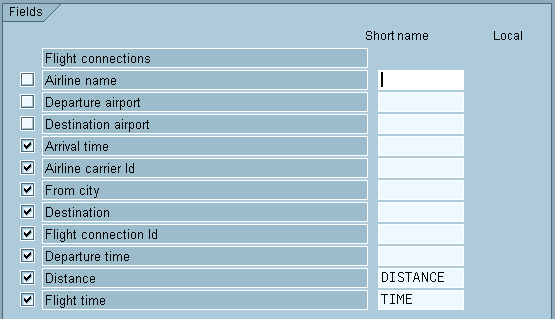
You are able to assign a short name to every field that is made available by an InfoSet. Short names are used when the value of a field is displayed in a header (see
Changing Headers) or when a field is used to calculate a local field (see Defining Local Fields).
Only in these cases do you need to assign a short name.
Prerequisites
You are in the Field Selection screen and want to create a new query or change an existing query.
Procedure
 and
and  functions to navigate in the Field Selection screen.
A short name has a maximum of 10 characters. It must always begin with a letter, and contain only letters, numbers, and underscores (‘ _ ‘).
Extra Functions
If you want to know whether a short name is needed, place the cursor on the field in question or on the short name and select Edit
® Short Names ® References. You get a list of all the places in the query definition where the short name is used.
This function returns a where-used list for the short names only . It does not indicate which sublists of the query use the associated field.
Example
The section on
defining local fields, tells you how to determine a local field that uses the fields Distance and Flight Time. Short names are assigned to these two fields.