

 System Errors Monitor
Use
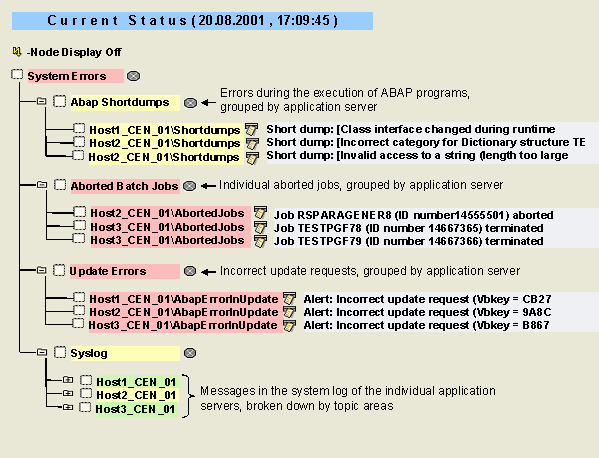
You can use the System Errors monitor to obtain information about the most important error messages of your SAP R/3 System. The various subtrees are taken from the following monitors of the SAP CCMS Monitor Templates monitor set:
Features
The following table provides information about the monitoring tree elements (MTEs) of this monitor:
|
MTE |
Description |
|
ABAP Shortdumps subtree |
Errors during the execution of ABAP programs are displayed here in the status attribute Shortdumps. The system has created a dump and reported this to the monitoring architecture. Transaction ST22 (ABAP Runtime Errors) is set as the analysis method. For more information about this topic, see  Program Checks. Program Checks. |
|
Aborted Batch Jobs Subtree |
Errors during the execution of jobs are displayed here in the Aborted Jobs status attributes. A separate red alert is generated for each of these jobs. Transaction SM37 (Job Selection) is set as the analysis method. |
|
Update Errors Subtree |
Incorrect update requests are displayed here in the ErrorInUpdate status attributes. Transaction SM13 (Update Requests) is set as the analysis method. For more information about this topic, see Analyzing and Correcting Update Errors. |
|
Syslog Subtree |
This subtree corresponds to the Syslog monitor. You can use it to monitor thesystem log for the various application servers in your system. The messages are assigned to different subtrees for different topics. |
Activities
To start the monitor, follow the procedure below: