

 Syslog Monitor
Use
You can use this monitor to monitor the
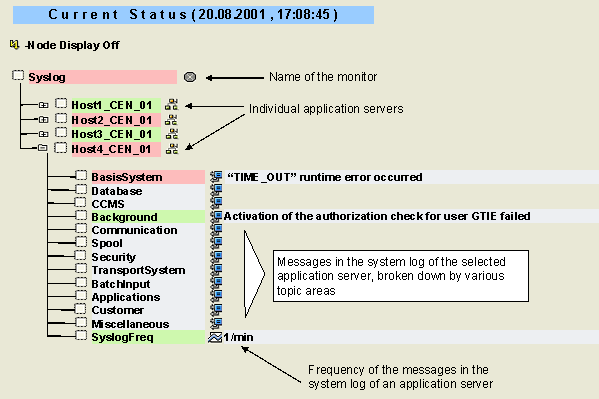
 system log for the various application servers of your system. The messages in the system log are grouped into subtrees linked by topic. The subtree in which an alert is reported depends on the category of the message. You can set these categories using the message ID in transaction SE92 (Maintain Syslog Message). You can also set the message text and the severity and criticality of the alert using this transaction. Note, however, that changes in this transaction are regarded as modifications and could therefore interfere with the import of a Support Package or a new SAP Basis or SAP Web Application Server release. We therefore recommend that you make changes directly in the Alert Monitor (see below).
Features
The various monitoring tree elements (MTEs) of the monitor correspond to the following categories that you can choose in transaction SE92:
|
MTE |
Category in SE92 |
|
BasisSystem |
SAP R/3 Basis System |
|
Database |
Database |
|
CCMS |
Operation Trace |
|
Background |
Background Processing |
|
Communication |
Communication |
|
Spool |
Spool/Printing |
|
Security |
Security |
|
TransportSystem |
Transport |
|
BatchInput |
Batch Input |
|
Applications |
Applications |
|
Customer |
Customer Message |
|
Miscellaneous |
No category assigned |
The SyslogFreq MTE specifies the number of messages per minute that appeared in the system log of an application server.
Activities
To start the monitor, follow the procedure below:
Changing the Alert Properties
You can also set the criticality and severity of an alert for a message directly in the Alert Monitor. In doing so, you overwrite the values that you entered in transaction SE92. To change the properties, follow the procedure below in the Syslog monitor:
 ) pushbutton.
The message
|
From ID |
To ID |
Green |
Yellow |
Red |
|
A00 |
ZZZ |
X |
||
|
AB0 |
AB0 |
X |
||
|
F20 |
F20 |
X |

As the entries are processed from top to bottom, you must consider the sequence of the entries. In the above example, the message ID
F20 is assigned a red alert, as the corresponding line is further down the list than the line in which F20 is assigned a green alert (F20 is contained in the range A00 to ZZZ).