Reconstructing Assigned Values
Use
Reconstructing the assigned values ensures that availability control can recognize an excessive funds assignment in the new hierarchy or in a budget structure element in time, in accordance with the changes you have made (such as budget profile, follow-up posting). If you do not reconstruct the assigned values, availability control makes its checks based on the "old" dataset.
A reconstruction of assigned values is necessary in the system following these activities:

If not all of the expenditure FM account assignments of a cover pool, but only one or several are also in a unilateral cover eligibility relationship or are linked with a revenue item in the call procedure for revenues increasing the budget, it can lead to an exceeding of the budget after the reconstruction of the assigned values.
If this condition is met by you, you must cancel the cross assignments to avoid an exceeding of the budget prior to the reconstruction of assigned values, in order to save the the budget claimed in the expenditure FM account assignment as "real" budget. For more information on cancelling cross assignments, see:
Prerequisites
There must be at least one budget structure element with a budget.
Ensure that no other activities, particularly budgeting or document entry, can be carried out in the system while the reconstruction is in progress.
Activities
To reconstruct the assigned values, choose Budgeting
® Tools ® Reconst.assgd vals.You must enter an FM area and a Fiscal year independent of whether you are working with annual values or overall values.
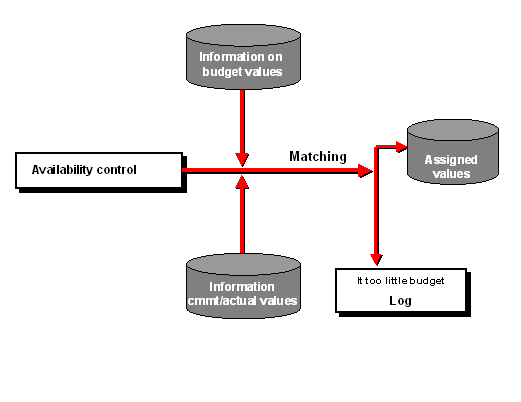
The graphic below illustrates the flow of assigned value reconstruction. Note that the system only outputs a log if the reconstruction leads to a budget overrun.
Assigned Values Reconstruction