

 Intermediate Documents for Scheduling Agreements
Purpose
When a customer sends in a document by Electronic Data Interchange (EDI), it is converted into an intermediate document with SAP format before being introduced into the R/3 System.
Process Flow
Note that this process flow uses delivery schedules as an example.
External agent documents and self-billing documents sent by EDI are processed in much the same way.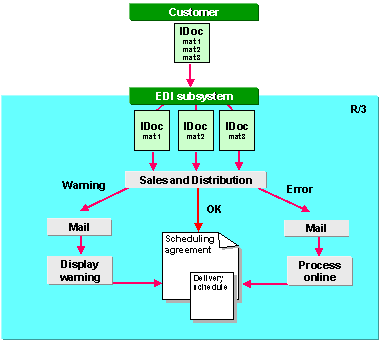
To find the scheduling agreement, the system checks:
Note that the system checks only items that have not been rejected. If this search is unsuccessful, the system also checks on the basis of the customer/material number only.
Result
If processing is successful, the system creates or updates the delivery schedule in the scheduling agreement. The IDoc is sent back to EDI-Basis which updates the status records.
If it cannot find the scheduling agreement, or if an error occurs in processing, the system
determines the employee responsible and sends an electronic mail. This person can then:To display the IDoc for the current delivery schedule, choose DlvSch.Hdr on the delivery schedule tabstrip. Then choose Edit ® Curr. IDoc for dlv.sched.
Additional Information
For information on Customizing settings for incoming IDocs for component suppliers, see
Controlling Incoming EDI.For more information on EDI in general, see
 IDoc Interface / Electronic Data Interchange under Basis Components ® Basic Services / Communication Interfaces (BC-SRV).
For information on EDI specific to Sales and Distribution, see
Electronic Data Interchange / IDoc Interface (SD).For related information, see the
intermediate document (IDoc) process flow.