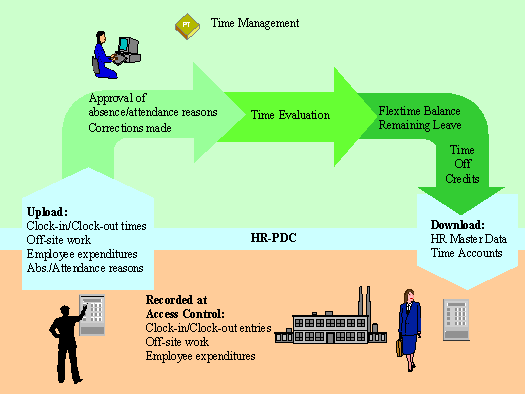
Connection with External Time Recording Systems
Use
This function allows you to upload personnel time events recorded at a time recording system to R/3 Time Management (PT). The personnel time events are then processed further in R/3 Time Management, so that recorded times can be monetarily valuated at the end of the process in R/3 Payroll Accounting (PY), ultimately resulting in salary and wages payments for employees.
Time recording systems are connected to the R/3 Time Management component via the Plant Data Collection: Employee Times and Expenditures (HR-PDC) interface. HR-PDC is a certified interface, that is, providers of time recording systems can earn certification for their software to communicate with R/3 Time Management.
Release 4.5A includes two versions of the interface. The old interface is connected via Communication Channel 1 (CC1).
:
 Transceiver-Based Transfer (as of R/3 System Release 3.0)
The following information deals specifically with the version based on BAPI technology.
Integration
Via HR-PDC, both personnel time events and employee expenditures (external wage types, cafeteria or service station data) can be uploaded to R/3 Time Management.
Two variants of the business process are available:

The certification process for time recording systems takes place in modules. At least one of the modules detailed here must be certified.
Prerequisites
The Customizing steps described in the Personnel Time Events section of the Implementation Guide (IMG) for Personnel Time Management (PT) should be carried out.
The time event types are permitted depend upon the modules implemented in your system, as follows:
Time Event Type |
Function |
Modules |
P01 |
Clock-in or Clock-out Entry |
Clock-in or Clock-out Entry |
P02 |
Start or end of off break |
Clock-in or Clock-out Entry |
P03 |
Start or end of off-site work |
Clock-in or Clock-out Entry |
P04 |
Start or end of off-site work at home |
Clock-in or Clock-out Entry |
P05 |
Interim posting |
Clock-in or Clock-out Entry, Clock-in/Clock-out Time, Additional Time Event Types |
P10 |
Clock-in |
Clock-in/Clock-out Time |
P11 |
Change |
Clock-in or Clock-out Entry, Clock-in/Clock-out Time, Different Payment, Cost Assignment |
P15 |
Start of break |
Clock-in/Clock-out Time |
P20 |
Clock-out |
Clock-in/Clock-out Time |
P25 |
End of break |
Clock-in/Clock-out Time |
P30 |
Start of off-site work |
Clock-in/Clock-out Time |
P35 |
Start of off-site work at home |
Clock-in/Clock-out Time |
P40 |
End of off-site work |
Clock-in/Clock-out Time |
P45 |
End of off-site work at home |
Clock-in/Clock-out Time |
P50 |
Employee expenditures (external wage type) |
Employee expenditures |
P60 |
Information posting |
Clock-in or clockout, clock-in/clock-out times |