Processing Personnel Time Events
Use
This function allows you to process personnel time events recorded at a time recording system in SAP Time Management (PT).
Integration
SAP System Functions
External System Functions
Data Flow
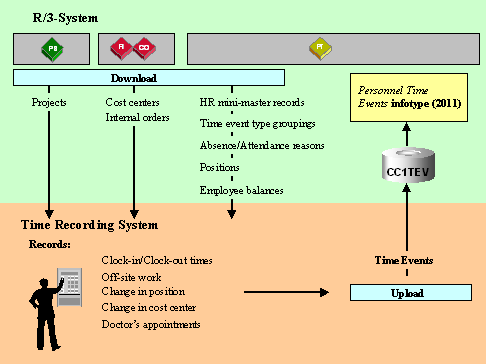
Data is sent from the SAP System to the time recording system to be checked or to be displayed for employees.

Providing external time recording systems with data from the SAP System is called a "download."
Providing time recording systems with permitted cost centers, internal orders and customer orders occurs in SAP Controlling (CO).
Providing time recording systems with permitted projects occurs in SAP Project System (PS).
The other data is downloaded from SAP Time Management (PT) to the time recording system.
In external time recording systems, the time events (such as clock-in/clock-out times) are recorded and then checked against the data downloaded from the SAP System.
The data recorded is then uploaded to SAP Time Management in the
 Time Events infotype (2011). The time events can be processed further to determine attendance durations.
Providing the SAP System with data from external time recording systems is called an "upload."
Prerequisites
Clock-in/Clock-out Time Module
This module is implemented if you need employees to specifically enter a time event type at the time recording terminal.

When clocking-in, employees must swipe their time ID card at the time recording terminal as well as press the clock-in button.
Clock-in or Clock-out Entry Module
This module is implemented if you want the time event type entered to be based on the employee’s existing absence or attendance status at that particular moment.
When clocking-in, employees must swipe their time ID card at the time recording terminal. If the employee’s existing status is "absent," then this entry is automatically recorded as "clock-in."
Different Payment Module
This module is implemented only if you want employees to enter an different, or alternative, payment at the time recording terminal.
When clocking-in, employees enter the position for which they will perform tasks in the following hours. After the upload, employees are assigned the payscale of this alternative position.