Financial Statement Item (and Its Subassignments)
Definition
Fundamental account assignment in the entry, posting, and reporting of quantities or monetary values.
Use
Financial statement items can have different contents. They can represent the following:
Structure
A financial statement item is valid only for the consolidation chart of accounts in which it was created.
You enter the following information in the master record of a financial statement item:
Subassignments
Through subassignments you can differentiate and "expand" the FS item values further. There are standard subassignments which are delivered by SAP, as well as custom subassignments.
Standard subassignments are:
Custom subassignments could be for example:
See also:
Custom Characteristics.Subassignments keep the number of items in consolidation charts of accounts down to a manageable level. Without subassignments, you would have to figure out all combinations of subassignments and define them as FS items. For example, you would have to create an FS item for receivables or liabilities for each partner unit.
Not all items require the same subassignments.

For example, you must enter the values of the items receivables and liabilities with partner breakdown and possibly with breakdown by transaction currency if you want to consolidate these values.
The values of the FS items of the transferred assets, however, must be differentiated by transaction type to show an asset history sheet.
Therefore you create groups of items that require the same assignments. There are usually some items that do not require subassignments.
Breakdown category
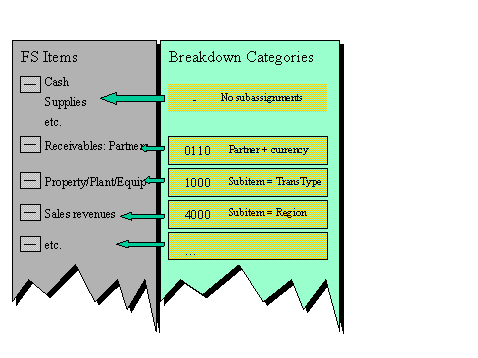
You define a breakdown category in Customizing for each FS item set that requires subassignments. In the master record, you assign this breakdown category to all FS items of the group.
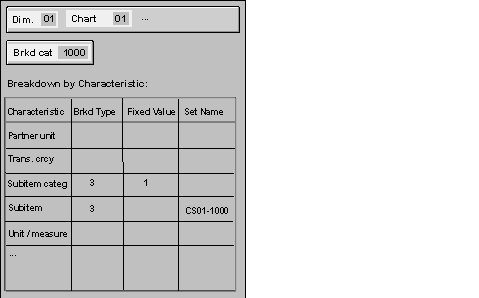
With the definition of a breakdown category the system offers you all the standard subassignments and all the custom subassignments. Per subassignment you specify:
The breakdown type determines whether the FS item value should be expanded when entering and posting to this subassignment and how the system should check the respective subassignment.
The system offers the following breakdown types:
|
Breakdown type |
Description |
Meaning |
|
0 |
No breakdown |
|
|
1 |
Optional breakdown |
Null value allowed. |
|
2 |
Required breakdown |
If no entry, then the system sets the default value. |
|
3 |
Required breakdown |
The system forces the value entry; the default value is allowed. |
|
4 |
Required breakdown |
The system forces the value entry; the default value is not allowed. |
A fixed value specifies the characteristic value of the subassignment and to be precise for all FS items with this breakdown category. You enter a fixed value for the following subassignments:
You can enter a set with default values (except with fixed value), which are to be shown during online or offline data entry.
You will find more information on the fixed value and the default set in the Implementation Guide for Consolidation, step Master Data
® Financial Statement Items ® Subassignments ® Define Breakdown Category.The following graphic shows the Customizing of a breakdown category.
The next graphic shows different breakdown categories from the SAP standard system and its use:
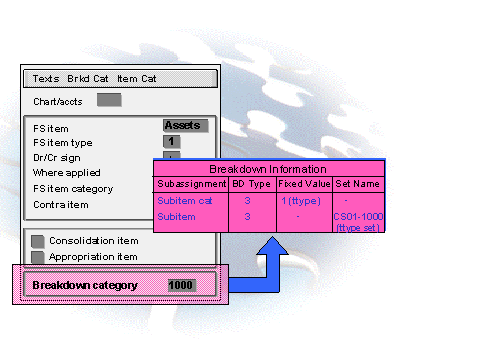
The next graphic shows the assignment of breakdown category 1000 in the master record of a fixed-asset item. The breakdown category means that the item values are to be broken down into subitems. The subitem (subitem category) is used as a transaction type (subitem category with fixed value 1).
Integration
If you want to integrate reported financial data from operational SAP applications into consolidation, there must be a link between the operational FI accounts and (if applicable) the secondary cost elements on the one hand, and the items of consolidation on the other:
To ensure that the codes match, you can create the consolidation chart of accounts based on an FI chart of accounts or financial statement version.
You will find more information in the section
Group chart of accounts, financial statement version, consolidation chart of accounts