

 SAP@Web Studio User Interface
Purpose
This process describes the layout of the SAP@Web Studio user interface and explains how you can adjust it to suit your development needs.
The SAP@Web Studio user interface is a flexible development environment, which includes all the necessary features for creating, changing and managing the files required by the Internet Transaction Server (ITS) to drive applications.
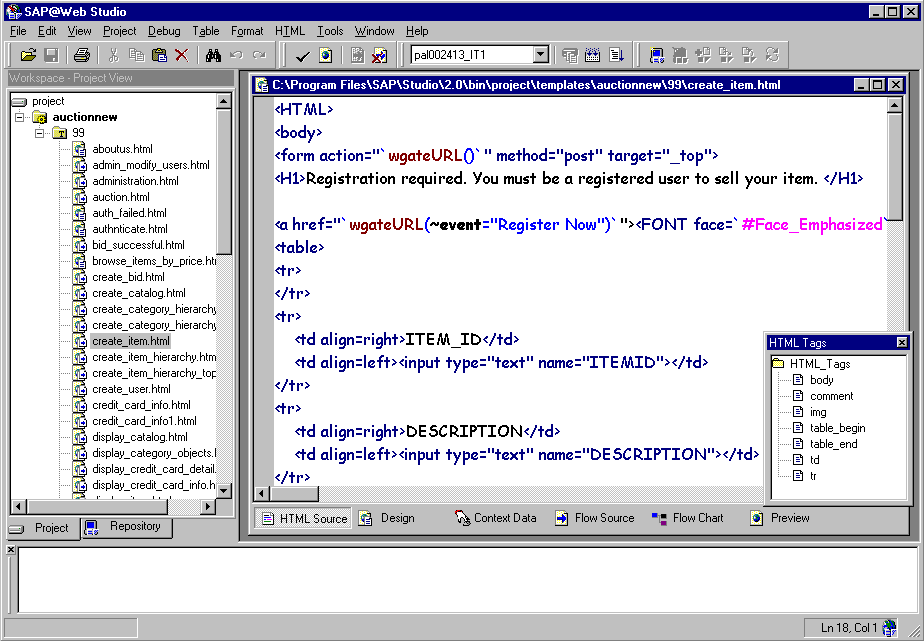
The above graphic shows the typical SAP@Web Studio user interface. Below the menu bar, there are several windows and toolbars that you can display and arrange as you like.
In this case, the Workspace – Project View on the left displays a project called
auctionnew and its constituent files. The HTML template file create_item.html is open for editing in the HTML Source view and the HTML Tags window contains a list of standard HTML tags for insertion. The message area, which occupies the entire lower section, is blank.
When you start the SAP@Web Studio, you see blank Workspace and message area windows. No HTML template file is open for editing.
For information about starting and stopping the SAP@Web Studio, understanding the different user interface elements and adapting them to suit your development needs, see the following sections: