

 Transaction-Specific Dialog Monitor
Use
You can use this monitor to monitor the response times for individual transaction or clients. This monitor is therefore especially well-suited for Service Level Agreements, with which service providers commit themselves to providing SAP services to their customers within a defined response time (see also
Monitoring Response Times of Transactions or Clients).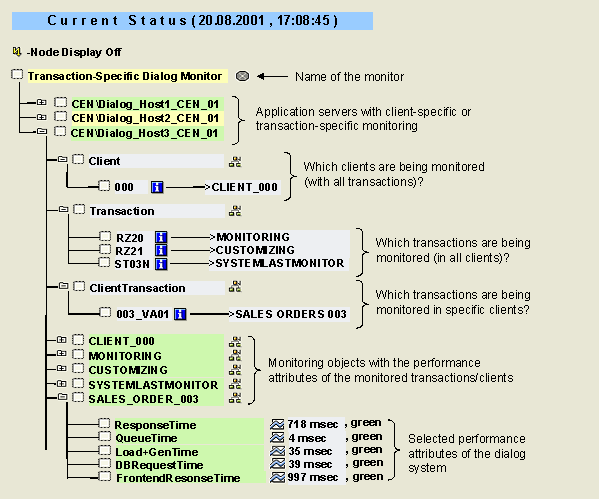
Prerequisites
You must first define which client and which transaction is to be monitored. This is done through entries in the ALTRAMONI table (see
Monitoring Response Times of Transactions or Clients and SAP Note 308048).Features
The monitor contains the following performance attributes:
|
Attribute |
Description |
|
ResponseTime |
Average response time of the dialog service including the database processing time, but not including the time for network transfer or the frontend processing time |
|
QueueTime |
Average wait time in the dispatcher wait queue (with a normal workload, there are always free dialog work processes available; the wait time is then only a few milliseconds) |
|
Load+GenTime |
Average load and generation time for source code, graphical user interfaces, and screen information from the database |
|
DBRequestTime |
Average time for processing logical database requests (calls to the SAP database interface) |
|
FrontendResponseTime |
Average time that the user waits at the frontend for his or her request to be processed (that is, the ResponseTime with the network transfer time and the frontend processing time) |
For more information about the attributes of the dialog system with recommendations about what action you should take if performance needs to be improved, see
Dialog Overview Monitor and Entire System Monitor.Activities
To start the monitor, follow the procedure below: