
 Task Selection
Use
TRM assigns the appropriate
task or task bundle to a resource requesting work.

As opposed to
task creation, at task selection it is known which resource will perform the task.
Activities
A resource uses its presentation device to log on and selects a task in one of three modes:
- User mode
- System-guided mode
- Semi system-guided mode
User Mode
The resource explicitly determines the task that needs to be selected by choosing an appropriate option from the
presentation device menu.
The resource scans a
handling unit and Task Management assigns the task to the resource.

Uri Kwan logs on using his presentation device and chooses Stock Transfer ®
Picking ®
Picking by handling unit.
System-Guided mode
The resource chooses a system-guided option from the menu.
Task Management queries Resource Management for the particular resource’s qualifications
TRM retrieves a list of ECOs to which there are tasks subscribed and sees whether or not these ECOs are available.
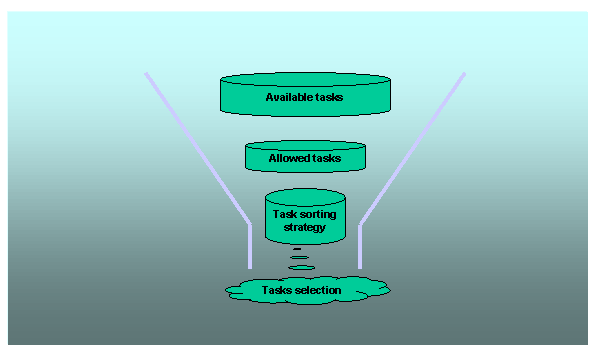
Task Management obtains a list of all tasks that the resource is capable of doing and eliminates those tasks that are subscribed to unavailable ECOs. If there is more than one task in this list, the tasks are prioritized.
Task Management assigns the highest priority task or task bundle to the resource.
Uri Kwan logs on using his presentation device and chooses Stock Transfer ®
Picking ®
System-Guided Picking.
Semi System-Guided mode
The resource chooses a system-guided option from the menu.
Task Management queries Resource Management for the particular resource’s qualifications.
TRM retrieves a list of ECOs to which there are tasks subscribed and sees whether or not these ECOs are available.
Task Management obtains a list of all tasks that the resource is capable of doing and eliminates those tasks that are subscribed to unavailable ECOs. If there is more than one task in this list, the tasks are prioritized.
If the highest priority task involves a source zone for which a dynamic ECO has been defined, the resource is sent to the zone, without being assigned a specific task.
The resource scans a handling unit and Task Management assigns to the resource the task associated with this handling unit.
Uri Kwan logs on using his presentation device and chooses Stock Transfer ®
Picking ®
System-Guided Picking. He is directed to a specific bin in a zone for which a dynamic ECO has been defined.
Both system-guided and semi-system guided modes involve the same presentation device menu options. However, in the case of semi-system guided mode, the existence of a dynamic ECO enables the system to give the resource the opportunity to choose a handling unit. For more information, see
Execution Control.
See Also:
Example: Dynamic ECO
Prioritization of Tasks