 Task
Task 
Definition
Tasks are elementary physical operations or movements created from requests and executed by resources.
Use
Tasks contain required information to move materials or perform operations on materials.
A task can either be assigned to a resource selecting the task, or manually assigned to a resource by the warehouse manager.
After being assigned a task, resources can do one of the following:
· Execute and then confirm the task
· Force confirm the task. Refer to Force Confirming Tasks.
· Skip the task. Refer to Skipping Tasks.

You define the activities of tasks in Customizing for Logistics Execution ® Task and Resource Management ® Master Data ® General Settings for TRM ® Activity catalog.
Integration
There are several relationships between tasks and requests:
...
1. One request to one task
2. One request to several tasks
3. Several requests to one task
4. Several requests to several tasks
One Request to One Task


A request involves putaway of a full pallet from the receiving area into a rack storage location. This could be performed by a simple forklift and thus a single move task is created.
One Request to Several Tasks
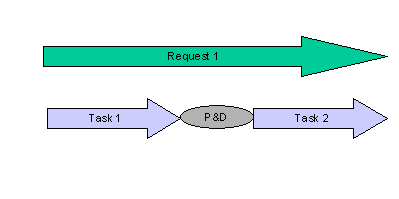
A request involves putaway of a pallet from the receiving staging area into high-bay storage location. This requires two different resource types, each performing a physical step:
...
1. Move pallet from the empty pallet zone to a intermediate P&D, using a pallet jack
2. Move pallet from P&D to the high-bay storage, using a turret truck
Thus two tasks are created.
Several Requests to One Task

Several requests are created for several putaway items for a mixed pallet needing to be taken to a storage bin. Since each putaway item needs to be taken to the same storage bin, a single movement task is created.
Several Requests to Several Tasks

Several delivery items need to be picked, packed and then moved from the picking area to the shipping staging area. The following tasks are created:
...
1. Separate picking tasks for each delivery item
2. A packing operation task
3. A movement task
