Fixed Rate Billing for the Repair Order
Use
Pricing is performed at service product or serviceable material level according to the standard pricing procedure PREP01 that is defined for the repair order.
You can use fixed rate billing in conjunction with the pricing function for configurable materials.

If the quantities in the repair or delivery sub-items of your repair orders often deviates from the quantity in the repair request item, we recommend that you define a user status (for example, manual processing required) that blocks the repair order for billing. Define that this block is set when the completion of the service order is reported back to the repair order. This enables you to check the results of pricing and make any necessary adjustments manually before you release the repair order for billing. You can then create a
For more information on defining a user status, see
 Status Management.
Prerequisites
To perform pricing for the serviceable material, you must change your settings for pricing:
For information on how you do this, see the Customizing activity User Exits for Pricing (choose Sales and Distribution ® User Exits ® User Exits for Pricing).

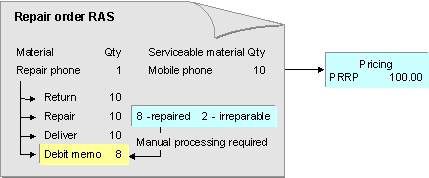
Outbound delivery quantity matches repair request item quantity
The customer sends in 10 mobile phones for repair. You enter this information in the repair request item. The system calculates the price for the repair request item using the pricing procedure PREP01. It finds a PRRP condition record for the serviceable material. When the repairs are complete, you bill the customer on the basis of the pricing information in the repair request item.
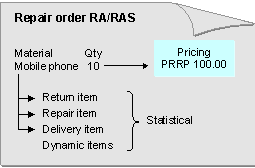
Repair request item contains a manual discount, Outbound delivery quantity deviates from repair request item quantity
The customer sends in 10 mobile phones for repair. You enter this information in the repair request item. The system calculates the price for the repair request item using the pricing procedure PREP01. It finds a PRRP condition record for the serviceable material. You enter a manual discount for the repair request item. During repairs, the service technician determines that only 8 mobile phones can be repaired. The other 2 can only be scrapped. You want the customer to be invoiced for the repair of 8 phones only and according to the price calculated for the repair request item. In this case, it makes sense to block the repair request item for billing to enable you to check the results of pricing. You can then make the necessary manual adjustments and release the item for billing.
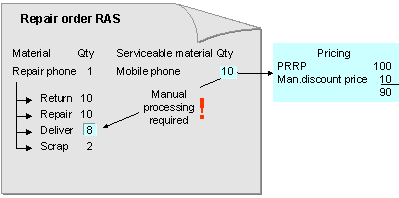
Actual quantity repaired deviates from the repair request quantity and the delivery quantity
The customer sends in 10 mobile phones for repair. You enter this information in the repair request item. The system calculates the price for the repair request item using the pricing procedure PREP01. It finds a PRRP condition record for the serviceable material. The service technician can only repair 8 phones. The remaining 2 phones are to be scrapped. The customer requests that you send all 10 phones back to them. You invoice the customer for the repair of 8 phones. In this case, it makes sense to block the repair request item for billing, as you want to adjust the prices calculated for the repair request item manually before billing the repairs.