

 Period-Based Encumbrance Tracking
Use
Period-based encumbrance tracking allows you to represent a precise change history of commitments documents in the course of a fiscal year in Funds Management. This means that document and account assignment changes are entered in commitment as individual documents in period-based encumbrance tracking and do not result in original document data being overwritten. The data records generated in commitments are logged as amount type Change together with the corresponding change date.
In contrast, changes in year-based encumbrance tracking result in a correction of the commitment amount. The open item of the commitment is also updated and the original amount of the original document is also overwritten. Irrespective of the amount updates, the commitment document date stays as the original document date. A change history for the commitment reduction in relation to a fiscal year is not possible.
Period-Based and Year-Based Encumbrance Tracking
The following example shows the reduction of a commitment and the data records of the period-based encumbrance tracking generated in this process compared with the corresponding changes to the data records of the year-based encumbrance tracking.
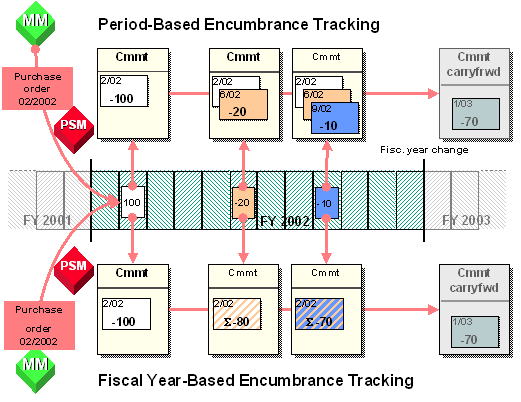
At fiscal year change, in the context of commitment carryforwards, only the currently open items in the previous year are written off and carried forward to the following year. This applies for both period-based and year-based encumbrance tracking.

If you want to use period-based encumbrance tracking in your organization, you should first consider the following points:
The volume of data increases manifold depending on the number of changes and the generation of change documents.
Once you have activated and configured period-based encumbrance tracking, it is not possible to resort back to fiscal year-based encumbrance tracking.
Prerequisites
Features
Determining Update Date Manually
Change documents in commitments are saved as standard with the system date.
You can override the system date of a change document in commitments by setting an individual update date manually. The manual setting of an update can be set up in the system dependent on the user.
You set a manual update date by choosing Accounting ® Public Sector Management
® Funds Management ® Posting ® Tools ® Period-Based Encumbrance Tracking ® Define Update Date.
As well as setting a manual update date via the menu, you can also use customer enhancement of module EXIT_SAPLFMFA_004. During the generation of commitment changes a dialog box is opened automatically. In this dialog box you can enter the update date.
Deriving the update date from the version management of purchase documents
If you have activated the version management for the purchase documents purchase requisition and purchase order in Materials Management, then you can determine the posting date when you create or change purchase requisitions/purchase orders. This posting date is then copied to the commitment change document.
The field selection (hide, display, optional entry, required entry) that you can define for the posting date in version management has the following effects on the update date in the commitment change document:
If you do not enter a posting date in the purchasing document, the update date created manually (see above) is copied into the corresponding commitment document.
If you have defined the posting date as a required entry and do not enter a date, the system date is entered in the purchasing document and is also copied into the corresponding commitment document.

If you have activated the period-based encumbrance tracking in Funds Management and the version management of Materials Management, you should define the posting date for purchasing documents as optional entry or required entry in the version management.
Selective Control of Period-Based Encumbrance Tracking
In the context of period-based encumbrance tracking, you can selectively determine in which posting periods and for which commitments documents a detailed change document entry should be made.
You achieve this by specifying for the affected open posting periods which budget categories (payment budget and/or commitment budget), value types and FM account assignments are to be affected.
You can use individual processing or mass processing to processing the appropriate posting periods.
For more information, see
Opening and Closing Posting Periods in Funds Management.Evaluating Commitments and Actuals Data
In the information system, there are programs for the evaluation of annual and overall budget against commitments and actuals data.
You execute the programs by choosing Accounting ®
Public Sector Management ®
Funds Management ®
Information System ®
Periodic Views. For more information, see the corresponding program documentation by selecting  (Program documentation Shift+F1).
Activities
You make this setting in the Customizing of Funds Management, under Actual and Commitment Update/Integration ® General Settings ® Override Update Profile.
For more information, see activity Override Update Profile in the Implementation Guide.
Note that, at first, all posting periods are closed as standard.
You open posting periods by choosing Accounting ® Public Sector Management ® Funds Management ® Additional Functions ® Closing Operations ® Open and Close Posting Periods / Fiscal Years ® Individual Processing or Mass Processing.
See also:
Example: Period-Based Encumbrance Tracking