

 Unilateral and Reciprocal Cover Eligibility
Use
You can use unilateral and reciprocal cover eligibility to make expenditure budget that has not been consumed in one area available for other areas as additional budget if required.
Prerequisites
Customizing
To be able to use unilateral and reciprocal cover eligibility, you must have executed the following steps in Funds Management Government Customizing.
If an expenditure FM account assignment is to participate in all three cover eligibility procedures - revenues increasing the budget in the call procedure, unilateral cover eligibility and reciprocal cover eligibility - you must define the order in which the budget available from the "cover eligibilities" is used in this step.
For more information, see the documentation for these steps in the Funds Management Government Implementation Guide.
Master Data Maintenance
Rules must be defined in master data maintenance to determine the cover eligibility relationships (entitled to cover, subject to cover) between FM account assignments.Additional Requirements
You should be aware that, aside from the necessary Customizing settings, unilateral and reciprocal cover eligibility can only be used if the following conditions are met:
For more information, see the Funds Management Government Implementation Guide (IMG) in section Maintain Budget Profiles.
This restriction does not apply for German Government customers.
Process Flow
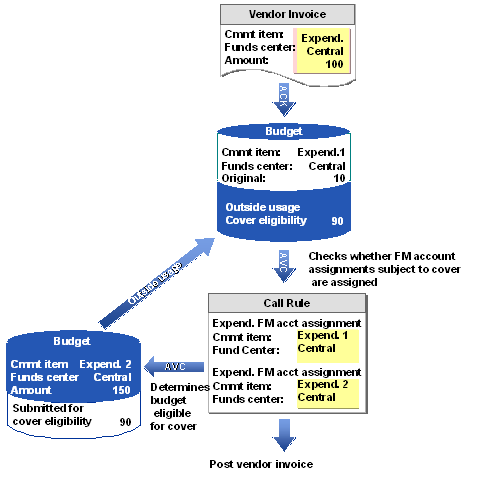
If an expenditure FM account assignment is participating in a cover pool, it may "help itself" in turn from the expenditure FM account assignments. With reference to individual FM account assignment, no order is defined as to which FM account assignment may first "help itself" from another; the same holds true for the order if the budget of the first FM account assignment found is not sufficient. You can use characteristic groups and their characteristics to group together individual expenditures FM account assignments within an expenditure cover pool for priority checking with active availability control. For more information, see
The following graphic summarizes the process flow again
Result
You can display the current assignments existing in the budget-issuing expenditure FM account assignments and the budget-claiming expenditure FM account assignments in the information system in the Cross-assignments and Outside Usage report. You can also display the outside usages for each expenditures FM account assignment in the Commitments/Actuals for Assigned Budget line items report.
You can cancel the cross assignments at any given time by restructuring the budget from the budget-issuing expenditure FM account assignments to the budget-consuming expenditure FM account assignments. For more information on this topic, see
Resolve Cross Assignments .
You should be aware that only a limited number of elements that are eligible for cover are checked. You must therefore execute program Indicate FM account assignment as eligible for cover (RFFMKT50) every night.