

 Pages of a Form
Definition
On the pages of a form you determine the page layout and the sequence of pages with different structures. If makes sense to distinguish between draft pages and print pages:
The page layout includes the page format (for example, DIN A4, Letter, DIN A5 landscape) and the position of the windows on a page.
Use
The individual pages of a form differ in their structure. The first page of an invoice, for example, contains an address, which you do not want to display on the next page; and you may want to display the General Terms of Business on the last page. You determine this structure using draft pages. For each draft page, you must specify a next page to make the page sequence clear. You can also repeatedly call the same draft page if you want recursive output.
Example
Many forms contain only two pages of different structure, for example one for the letter and one for listing the invoice items. For such a form you need two draft pages; the second page, which is defined as next page of the first one, calls itself as next page. If the text does not entirely fit onto the second print page, another print page with identical structure is started automatically. The diagram below illustrates this example:
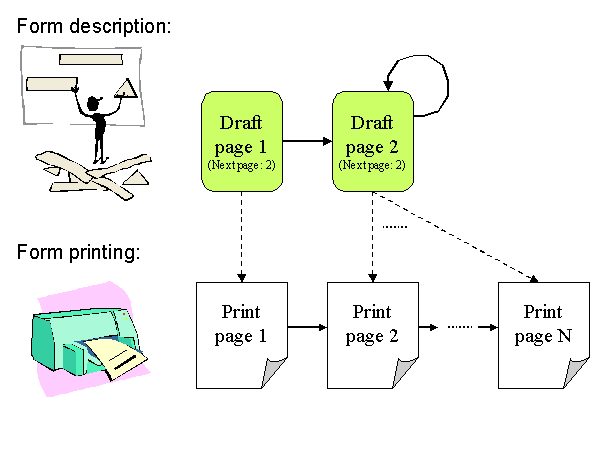
For draft page 2 the question arises when to start printing a new page, that is, when to trigger a page break. The page break is triggered either automatically by the main window (see also
Main Window and Secondary Windows) or built into the form logic (see also Determining the Page Sequence).