Memory Management of the SAP Gateway
Shared Memory Segments
When the gateway is started, two shared memory areas are created in shared memory pool 20. The size of the pool is first calculated, thus avoiding the need to read profile parameters.
Segment 21, Gateway Tables
The following data is stored in segment 21:
The size of segment 21 depends in the size of the various components; the default setting is 500 KB.
Segment 22, CPIC Requests
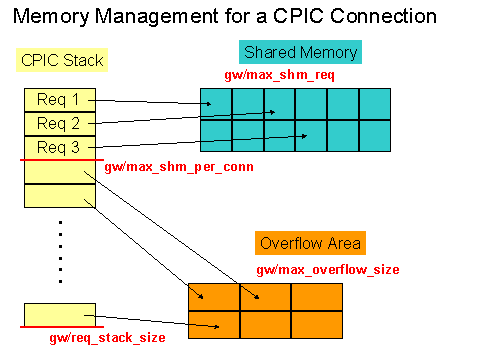
The data of a CPIC request can be stored in this segment. This offers the advantage that instead of data having to be copied, only pointers into the shared memory need to be set.
The size of segment 22 is calculated as follows:
The maximum size of a request (40728 bytes) multiplied by the number of shared memory segments (profile parameter
Overflow Area
If data can no longer be stored in the shared memory area, the system attempts to temporarily store the data in the overflow area.
The size of the overflow area is specified by the profile parameter
CPIC Requests
A specific number of requests can be temporarily stored per CPIC connection. This number is determined by the profile parameter
gw/req_stack_size; the default value is 30. The system first attemps to store the individual CPIC requests in shared memory. The number of CPIC requests that can be stored in shared memory is determined by the profile parameter gw/max_shm_req_per_conn. When the shared memory area is 75% filled, no more CPIC requests can be stored in shared memory, and the data must be stored in the overflow area. When the number of requests stored at a time exceeds a threshold value (max(stack_size-6,90% stack_size)), the sender is slowed down by SYNC calls (see Overflow).