

 Configuring Proxies
Use
If you use the SAP Web Application Server as an HTTP client, you can determine a proxy that is used for outgoing HTTP requests.
A proxy server is used as a security barrier between the internal network (intranet) and the Internet, by preventing other persons on the Internet from having access to the confidential information in the intranet.
Procedure
The following describes how you can configure a proxy server in Transaction SICF. You can also make the configuration in your client ABAP program when you generate the client object. You can find an example of this in
Sample Program.The following screen appears:
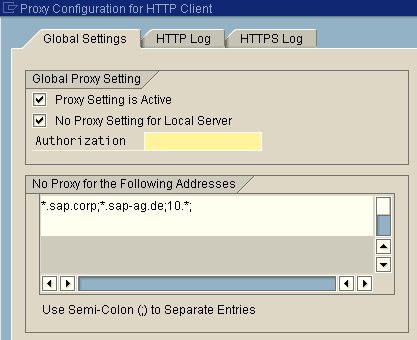
Here you can configure the proxy server that should be used.

Since a proxy server works as a security barrier between the internal network (intranet) and the Internet, you may require special authorization from the system administrator to access websites with the proxy server. It may be easier and faster to access local addresses if you do not use the proxy server.
You can use placeholders to assign domain and host names, such as
The ABAP language element "CP" compares addresses to assess individual entries for the use of the proxy setting.
The individual entries must be closed by a semi colon (;).
Furthermore, for the HTTP and HTTPS protocols, you can store the host name and the proxy server port, as well as users and passwords for logging onto the proxy server.

Ensure that the proxy settings are not transported!