 Post Reversal/Recalculation
Use
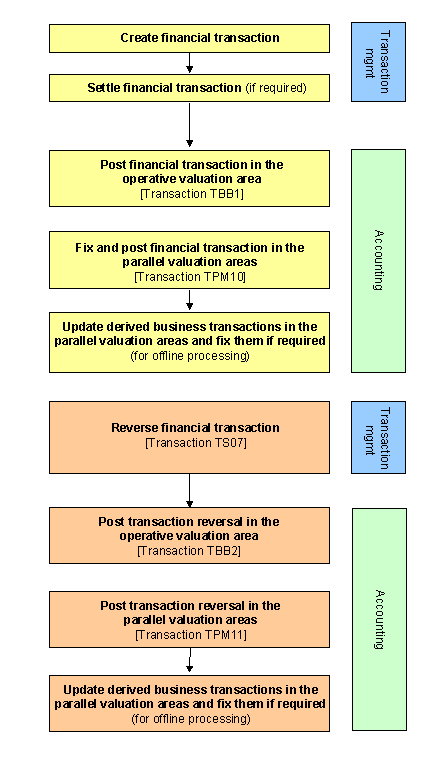
You use this function to post reversed flows in the parallel valuation areas for an activity that has already been reversed in transaction management.
The function also posts the reversed or recalculated derived business transactions.
Integration
Process Flow: Creating and Reversing Financial Transactions
Prerequisites
The financial transaction must have already been reversed in transaction management.
Features
You use this function to perform the following postings:
· Reverse flows for the reversed financial transaction in the parallel valuation areas (such as purchase flows or sale flows).
If you have opted for online processing in the IMG activity Control of Processing of Derived Business Transactions in Customizing for parallel position management, you can also perform the following postings:
· Reverse the "old" posted derived business transactions for the affected positions
· Reverse the recalculated derived business transactions that are relevant for posting for the affected positions.

If you opt for offline processing in the IMG activity Control of Processing of Derived Business Transactions, you recalculate and post the derived business transactions using the functions Update Derived Business Transactions and Fix Derived Business Transactions. See also: Derived Business Transactions
Selection
|
Posting Control |
|
|
· CFM Reversal Reason |
If you entered a reversal reason when you reversed the financial transaction [transaction TS07], you do not need to enter one here. |
|
· Posting Date |
|
|
· Posting Period |
|
|
· Test Run indicator |
If you set this indicator, the system simulates the reversal run. |
Output
The system displays a reversal log.
Activities
To access this function, choose Accounting ® Parallel Valuation Areas ® Transaction ® Post Reversal/Recalculation.
