

 IDs for Time Data
Definition
A time data ID is an easily identifiable combination of letters or numbers used for time data in the SAP System.
Use
The use of time data IDs dramatically reduces data entry workload for your time administrators. Now, time administrators simply select the appropriate ID to record time data, without needing to enter an infotype and a subtype.

You define time data IDs in Customizing for Personnel Time Management under Time Manager’s Workplace -> IDs for Time Data -> Specify Definition Sets and IDs.
You can also define colors for time data IDs for the Calendar Views. This gives users a better overview of the significance or frequency of time data and makes it easier for them to find particular time-management information, such as whether an employee will be available on a given day.
In the calendar views, there is a list of time data IDs on the left side of the calendars. Users can quickly drag and drop time data from this list to the calendar.
Structure
You do not need to assign individual IDs to each type of time entry. You are recommended to define special IDs only for the specific types of time data entered most often by your time administrators. Time administrators can use generic IDs to record other types of time data. They can then add further information in the
For more information, see the IMG for Personnel Time Management and choose Time Manager’s Workplace ® IDs for Time Data.
Example
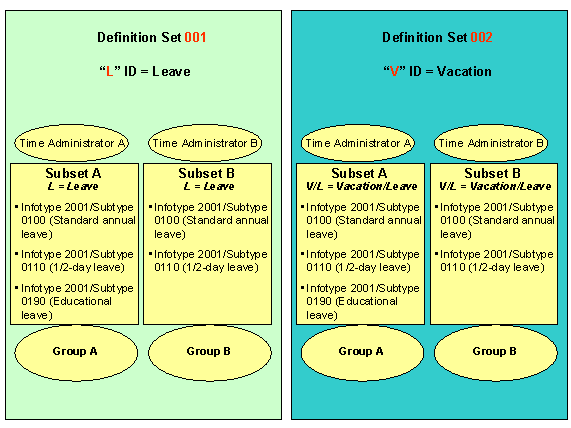
You create the definition set 001 for your UK subsidiary, and the definition set 002 for your US subsidiary.
For the UK definition set, "L" stands for a full- or half-day of standard annual or educational leave.
Time administrators in Group A need to use all three of these IDs to maintain their time data. No educational leave is permitted in Group B, so time administrators in this group do not use the specification "educational leave." You create subset A for Group A, and subset B for Group B.
You proceed similarly for your US subsidiary, however, you use the ID "V/L" for vacation/leave.