 Drawable Bonds
Use
Drawable bonds are bonds that are redeemed by "drawing" certain amounts on certain dates, according to the conditions of the bond.
· The issuer publishes the planned redemption schedules for the whole bond.
· If the issuer can give notice on the bond, the redemption schedule of the issuer can change over time as a result of this notice option.
· The individual buyer of a redemption bond has no control over the redemption payment amounts for the bond. On certain dates, a draw takes place to determine the units or series of units to be redeemed. Because the redemption amounts are only established by chance, the individual payment flows cannot be predicted for individual investors, and can only be estimated.
To account for this, the system gives you the option of defining different redemption schedules and redemption schedule sets in the class master data for the drawable bond.
See also:
Editing Redemption Schedule Sets and Redemption Schedules
Prerequisites
In order to map drawable bonds in the system, you must define product types for drawable bonds and installment bonds in Customizing for the securities area. You also need to define classes and names for the redemption schedule sets.
See also: Customizing for Drawable Bonds

Compare your settings with the model Customizing settings.
Integration
Business Application Programming Interfaces (BAPIs)
· If you receive the redemption schedule data from a data provider, you can use BAPIs to read the data into the system. The business object BUS1074 RedemptionSchedSet was created for this purpose and the following methods defined for it:
¡ Create redemption schedule sets (Create)
¡ Create redemption schedules for redemption schedule sets (AddSchedule)
¡ Change redemption schedule data (ChangeSchedule)
¡ Read redemption schedules for redemption schedule sets (GetDetail)
¡ Read header data for redemption schedule sets (GetList)
· The following evaluation reports are available:
¡
 List of Redemption
Schedules
List of Redemption
Schedules
¡
List of Redemption
Schedule Sets
Features
Process: Drawable bond
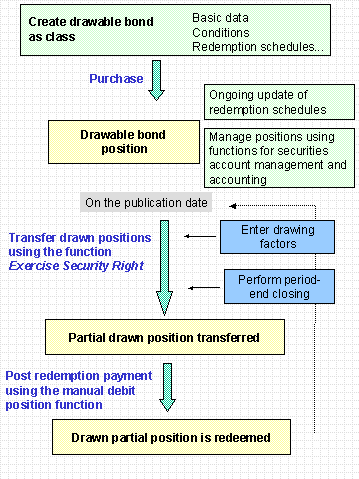
The following functions are available for performing the individual steps:
|
Function |
Prerequisites |
Result / Comments |
|
Create the bond as a class in the system. See also: Creating a Drawable Bond |
The issuer of the bond has already been created as a business partner in the role of issuer. |
|
|
Purchase of the bond See also: |
The drawable bond is recorded as a balance sheet position. |
|
|
Update the redemption schedules in the class data on a regular basis. |
This keeps the cash flow for the bond position up-to-date.
|
|
|
Manage the positions using the functions for |
|
|
|
Once the drawn amounts are made known on the publication date, or when the next redemption date is reached, you must transfer the drawn amounts using the function Exercise Security Right. See also: Exercising Security Rights |
·
You must
perform · All flows for the bond position must have Fixed status before the transfer date. ·
You must
create the · You can enter the drawing factor specified by the issuer using the function Edit Drawing Factors. |
The drawn partial position of the drawable bond is transferred to the corresponding installment bond.
|
|
You
can then use the |
You
must have performed |
The drawn partial position is redeemed. |
