

 Making Confirmations with the Palm
Prerequisites
You have selected activities in R/3 and carried out a Hot Sync (see
Downloading Activities).Procedure
When you start Open PS, a list of the transferred activities appears. There are two views of this list:
View 1 is the default. Tap on View 2 in the lower right-hand corner of the screen to change view.

You can see the current actual, planned, forecast values for work from the last confirmation in R/3 as well as the remaining work by tapping on the Information icon in the top right-hand corner of the screen.
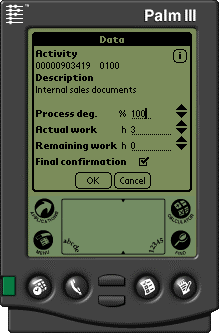
Unlike in R/3 the three numerical fields are not linked. This means that the actual work is not subtracted from the remaining work and that the degree of processing is not calculated from the total actual work and the remaining work.
When you set the final confirmation flag, Open PS for Palm checks whether the degree of processing is 100 % and that there is no remaining work. If either of these conditions is not true, a message appears offering to correct the numbers automatically. If you accept, Open PS sets the degree of processing to 100 % and the remaining work to 0. Whether you accept or not, you can transfer the activity back to R/3.
The next time you perform a hot sync the data is transferred to R/3 and the confirmations are made.
Menu Options
When you are in the confirmation detail screen, you can call up the Options menu. Here you can carry out the following functions:
Beam
You can beam the current activity to another Palm user who has Open PS installed on their Palm. Point the IR windows of the two Palms at each other and choose Beam on your Palm. The activity is transferred.
Reset
Cancels all entries that you have made for the activity and removes the Hot Sync flag from the activity.
Remove
Cancels all entries you have made for the activity and deletes the activity from the activity list.
Result
The data is transferred to R/3. Open PS only checks the data formally, for example whether you have entered numbers and not letters. R/3 checks whether the data is plausible as with every confirmation in the system.
When you make a final confirmation for an activity in Open PS, the program removes the activity from the list in your Palm.
See also:
Sending Confirmations by E-Mail