Entering content frameProcedure documentation Downloading Activities to a Palm Locate the document in its SAP Library structure

In order to confirm activities with the Palm, you must first download the relevant activities from R/3 to your Palm. There are two steps in this process:

Selecting Activities in R/3

  1. To call up the selection transaction, enter OPENPS in the command field. As from Release 4.6C you can choose Logistics/Accounting ® Project System ® Progress ® Confirmation ® Open PS for Palm.
  2. On the initial screen enter your selection criteria. You can enter a project definition, a WBS element, or a network or a range of these objects. You can also restrict the selection by specifying the WBS element level and/or the MRP controller.
  3. Before you execute the program, you must save a variant. This variant forms the link between R/3 and your Palm. Choose This graphic is explained in the accompanying text. On the next screen enter a name and a description for the variant. Choose This graphic is explained in the accompanying text.

"Hot Sync" with Palm

Make sure you have entered the system details in Open PS (see Entering System Data ).

Enter the variant in Open PS. To do so:

  1. Tap the Open PS icon on the Applications screen of your palm This graphic is explained in the accompanying text.
  2. From the menu choose Preferences.
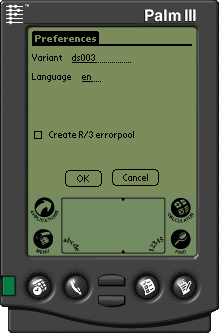
  3. Enter the variant that you saved previously and the language (two letter acronym as in R/3, for example EN or DE).
  1. Here you can also select the Create R/3 errorpool indicator, if you want the system to create an errorpool in the R/3 system.
  1. Tap OK.
  2. On the main Open PS screen, tap on the arrow in the lower left-hand corner. Normally the words No sync are displayed here. From the dialog box choose either Download or Up & Down.

Note

You use this switch to determine which way the transfer should run. The default value is No sync, which means no data is transferred during hot sync. During Download data is transferred from R/3 to the Palm. During Upload data is transferred from the Palm to R/3 and during Up & Down data is transferred in both directions.
This graphic is explained in the accompanying textThis graphic is explained in the accompanying text


The next time you carry out a Hot Sync the data is transferred to the Palm.


Leaving content frame