

 Prioritizing Displayed Information
Use
You use this function to determine which items of information are most relevant for a particular day. The form’s technique of overlaying information enables you to specify exactly which items of information you want to display on a public holiday, a working day, and so on.
Recommendation: Before you use the time statement productively, test all possible situations that may occur in your enterprise.
Features
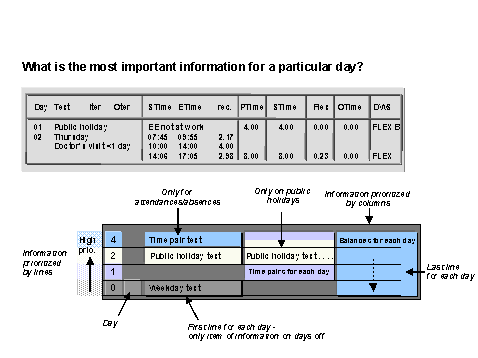
Line-by-line overlay of information
By assigning priorities within groups E* and P*, you determine which information is displayed on a particular day. You can set priorities of 1-9 and A-Z, where 9 has a higher priority than 1, and Z a higher priority than A.
You should assign a high priority to important information, such as the attendance/absence text. If, on one day, there is no information with a high priority (for example, on a public holiday there are no attendances or absences), the information with a lower priority is displayed.
Column-by-column overlay of information
Information for each day is overlaid column-by-column. This allows you to display information with a lower priority if no other fields are entered at this position in the form (see the Day column in the example.)
When you create a form, you should position all information that may possibly be overwritten, in columns, exactly under each other, to prevent overlaps. This can be done by assigning all single fields the same length.
Rules for displaying information
You can also specify rules to limit the situations in which certain items of information are displayed (for example, only on public holidays, working days with absences). To do so, select a field, and specify the situation in the rule field.
For more information, see
Rules for the Form Layout.