

 Technical Basics: Data Supplier
Data suppliers deliver all of the values that are displayed in the
Alert Monitor. They each belong to the individual system components and create monitoring objects that report values to the monitoring architecture. These values are displayed in the monitor sets.The monitoring architecture is delivered with the data suppliers for the most important components of your SAP R/3 System and its environment and can therefore be immediately used. When starting the Alert Monitor, you can see that the data suppliers for reporting for the following components are already active:
You do not need to prepare or activate the monitoring architecture. The data suppliers in your system are either started automatically when the system is started, or are started as they are required. There are two different types of data suppliers:
A data supplier writes the values for the monitored objects in a segment of the shared memory known as the monitoring segment. This monitoring data can be transferred to the monitoring architecture in two ways:
 CCMS agent, for any server; the transfer is performed using a Remote Function Call (RFC)
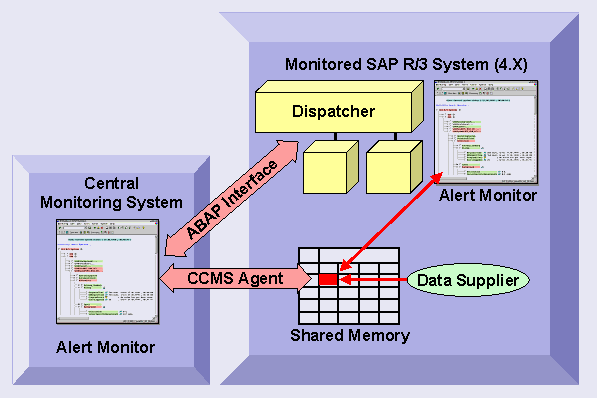

As the connection method using a CCMS agent does not require a free work process, the access method is therefore independent of error states of the SAP instance and therefore more robust. The CCMS agents also use
push technology with which the agents report alerts automatically, if the central monitoring system is running SAP Web Application Server 6.10 or above. This helps to ensure a good performance, as the central monitoring system then no longer needs to periodically query the agents for alerts. We therefore recommend that you use CCMS agents when connecting remote systems to the central monitoring system.
See also:
Methods Changing Properties and Maintaining Methods