
Output Options for Control Levels
When you specify a sort sequence, the next screen in the sequence of query screens allows you to define the sort order and the output options for control levels.
If, for example, you want to sort in descending order, you must select the column Desc (descending).
To specify output of a blank line or a new page, you select the appropriate columns (BlnkLn, NewPg.). You can also display a complete control level, meaning all the associated lines, in a box. To do this for each of the flight connections between two places in our example, the column Box is selected for the Destination and From city.

You now execute the query which generates the following list:
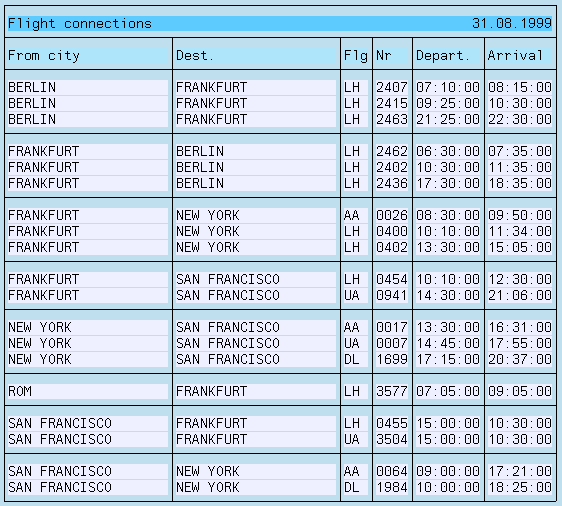
Control levels increase the options you have for varying the layout of your list. You can, for example, output a list with the following format:
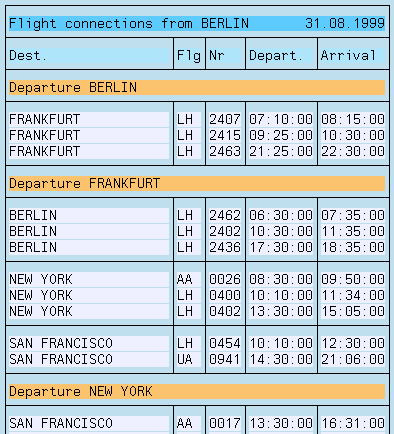
The sort criterion From city no longer appears on one line, but at the beginning of a control level.
To generate this list, you first copy the query
G2 and call it G3 .You can then change the query G3 . The field From city is not assigned to a line, but the sort is performed by this field.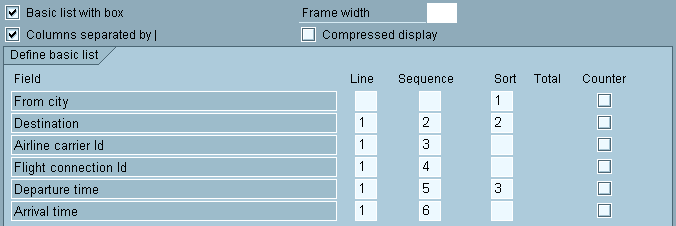
If you select the column Text for the appropriate level on the Control Levels screen, the (control level) text is displayed at the beginning of the control level.

In this case, you generate the list shown above.
Another useful variant of this query would be one which has the sort criterion From city in the header. To do this, you can copy the query G3 and call it G4. To achieve this, you select the column NewPg. for the control level From city so that, when a control break occurs, (that is, the sort criterion changes), a new page is started.

You must also assign a short name (for example, CITY) to the field From city (see
Assigning short names). This short name is then used as a replacement variable (&CITY) in the header (see Changing Headers). This displays the following list.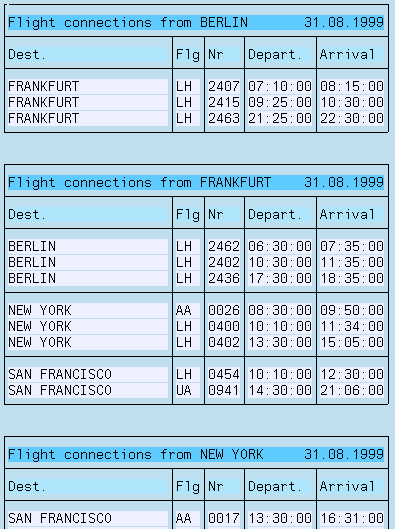
The advantage of this variant is that the sort criterion From city remains visible when you scroll in the generated list.