 Restoring the R/3 Database after Disk Crash
Restoring the R/3 Database after Disk Crash
Purpose
The procedure described here should be followed to restore the database when:
or
Prerequisites
The process described here is only applicable to a configuration with three disk systems; one system for the R/3 database, one for the R/3 transaction logs and one for all other files.
See also:
Distribution of Files to DiskProcess Flow
The database restore is comprised of a number of phases.
Restore Phases
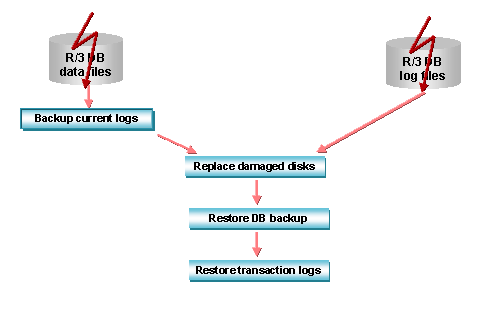
If the disk system on which the R/3 database resides is damaged, it is vital to immediately backup the currently active transaction log to prevent a loss of data. Without a backup of the current log, the database can only be restored to the status it had at the time of the last transaction log backup. If work has been carried out on the R/3 system since then, this work will be irrevocably lost. Therefore, after the failure of your transaction log disk, backup the current logs without delay.
For more information, see
Replacing damaged disks in a RAID disk system is normally a straightforward procedure. If you are uncertain how to proceed, refer to the documentation of your hardware vendor to find out how to handle the disks. The new disks must be formatted and assigned the same drive letter as the old ones.
The central phase of a restore operation is the reloading of the database backup and the application of the available transaction logs. When the database backup is reloaded, the database files are automatically recreated and the data is copied from the backup device to the newly created files. Once this has been done, the transaction logs are applied in the same sequence as they were originally made. This means that changes made to the database since the database backup are redone. In a final step, open transactions, that were not completed at the time of the database failure are rolled back.
At the end of the restore operation all transactions that were completed at the time of the database failure are written to the database and all incomplete transactions are been rolled back. Work in the R/3 System can be resumed.
For more information see
Restoring the Database Backup and Applying Transaction Logs
