 Line Item Reports
Line Item Reports
Actual Line Items
The line item report lets you select individual postings according to various selection criteria (profit center, revenue/cost element, posting date). It is only available if your system stores actual line items for the relevant controlling area and fiscal year. The line items are stored in table GLPCA.
The line item report also functions as a list of actual costs because it displays posting documents. To do this, all the selected line items are shown in list form. You can decide how much detail you require in the report as you can analyze the line items with varying degrees of detail.
Plan Line Items
It is possible to display plan line items in Profit Center Accounting, provided that your system stores plan line items for the desired controlling area and fiscal year (defined in Customizing). If this is the case, the plan line items are stored in table GLPCP.
Activities
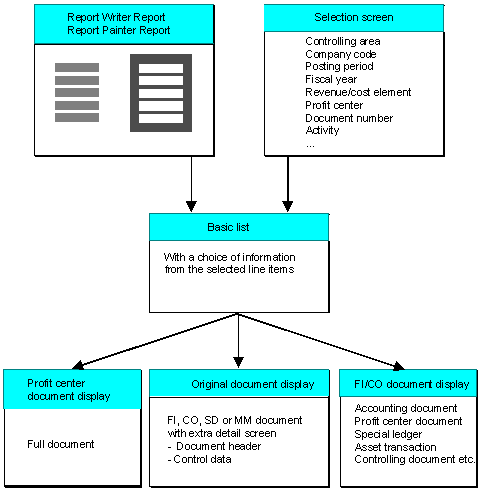
When you call up a line item report, you have two options (see the graphic below).
You can then limit the selection of line items on the initial screen. The report is displayed and can be analyzed further.
The system then displays all line items which correspond to the selection. The system carries out further analysis of the report just as with the direct report call-up. All the standard reports are defined to allow you to call up an actual line item report.
Screen sequence for line item reports
For further information about line item reports, see:
Executing a Plan Line Item Report Functions in Line Item Reports