Receiving Communication Documents in R/3
Receiving Communication Documents in R/3
In the test phase as well as in a productive system, the system manager should periodically check the operation of the system communications. To do this, a regular plan should be established to determine whether communication documents have been received without errors in the R/3 system and to carry out necessary updates.
Errors when Receiving Communication Documents
If errors are found (for example, no transfer requirement exists in the R/3 System for a stock movement that was posted in the R/2 System), you must determine whether the problem is a communication document transmission error (in the CPI-C) or an error in the operation of the Warehouse Management application. You can check this easily by displaying a list of communication documents in the system in which the documents were received.
Analyzing Errors
To identify and analyze errors that occur in the system, three tasks are available:
To use these tasks, choose Logistics ® Logistics Execution ® Internal Whse Processes ® R/2-R/3 Link ® Error Analysis from the SAP menu.
From the Error Analysis, continue as follows:
These tasks are discussed in more detail under the topics The Analysis Tool and Mail Control in the R/3 System.
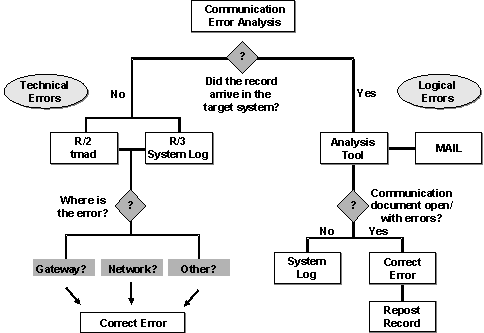
Technical Errors
If the error is a communication error (CPI-C), it is known as a technical error. To resolve technical errors, the communication path must be checked. For detailed information about the CPI-C interface, refer to the BC SAP-Communication: Programming Guide.
Logical Errors
If the error is an applications error, it is known as a logical error (for example, an incorrect entry in a table or missing information in the material master record). For instructions on how to analyze and correct logical errors, see
The Analysis Tool.Once you have corrected logical errors, you must repost the communication document to ensure that all necessary updates are carried out by the system.
Where to Look When Errors Occur
When errors occur, it is not always easy to figure out what caused them and where to look to correct them. The following chart in provides a logical sequence of actions and possibilities as to how to analyze and correct most errors that occur when working with the R/3 system. These same procedures can be followed to identify errors that occur when transmitting communication documents regardless of the source or target systems.