

To post a goods transfer for the R/3 WM component, two documents are always required:
The material document goods receipt or goods issue (GR/GI) document is posted in the R/2 System and initiates the updating of the stock quantities and values in Inventory Management.
The transfer order is posted in the R/3 System and used to determine the storage bins for the stock placement/removal. It initiates the updating of the stock quantities in Warehouse Management.
Creating Transfer Orders Automatically
As in the integrated Warehouse Management component, transfer orders can be generated automatically in the R/3 WM component after communication documents have been posted to the interface and the transfer requirements or posting change notices have been created from them. Using a background process, the system attempts to create transfer orders. In the case of an error, an express mail can be sent to an appropriate user. This user can then keep himself/herself informed about the error via his/her inbox and initiate the creation of a transfer order in a dialog box.
The activation of this function is dependent upon the movement type and takes place in the R/2 System (table 341).
To assign the recipient for mail messages in case of errors, see "Define decentralized link to R/2" in the Warehouse Management IMG documentation. You can assign a separate user for each communication document record type.
 The automatic creation of transfer orders is only possible beginning with Release 5.0G of the R/2 System.
Decision on Leading System
For each movement, you must decide which system is the leading system - that is, where you want to post the data first.
If you want to post the GR/GI document in Inventory Management first, there is a communication from R/2 ® R/3. This communication type will be explained in this section.
If you want to post the transfer order in Warehouse Management first, there is a communication from R/3 ® R/2. This communication type is explained in the section
R/3 ® R/2 Processes.
Certain goods movements, such as goods receipts for purchase orders, should be posted in Inventory Management first because in this transaction the system carries out checks that are only possible in the R/2 system.
General Process
If a goods movement (for example, goods receipt) is posted in Inventory Management first, and then in Warehouse Management, the procedure is as follows:
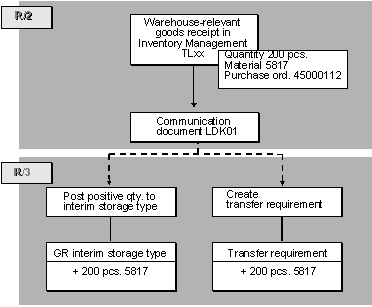
Goods Receipt
-
a positive quant is posted to the GR (goods receipt) interim storage area.-
a transfer requirement is created.Goods Issue
In the case of a goods issue, the procedure is the same, but this time the communication initiates the following updates in the R/3 System:
No LVS Posting Line
When you enter a goods movement in Inventory Management, it is not possible to view the interim storage information on the detail screen of an item (as in the integrated version of the system) because the interim storage area is determined and posted to only in the R/3 System.
Screen for Planning Date/Time
You can, however, enter a planning date and time for transfer requirement processing on an additional screen. This screen only appears if an indicator is set in the table for movement type control (table 341 in the R/2 System). This data is also transmitted.
Dynamic Coordinate
The dynamic coordinate of the interim storage area is generated from the GR/GI document number for all goods. In this way, there is always a direct link between the interim storage quant and the posting transaction in Inventory Management.
Interim Storage Area Search in R/2 - R/3 Interface
You can facilitate interim storage area searches in the R/3 WM component the same as you would in the integrated WM component; that is, the WM movement type determines the storage bin for the respective interface (see
Interim Storage Bins).You activate this new type of interim storage area search at the warehouse number level. To define the search method for interim storage postings, see the section Define decentralized link to R/2 in the Warehouse Management IMG documentation.
Account Assignment
The R/2 account assignment (for example, purchase order, cost center) is copied into the transfer requirement as the R/3 requirement. In this way, you can process the transfer requirements for a particular account assignment (requirement).
Differences
Differences recorded during transfer order confirmation are transmitted to the R/2 System. This procedure is described in the section on
R/3 ® R/2 Processes.Technical Process in R/2
When a goods movement is recorded in R/2, the communication process is as follows:
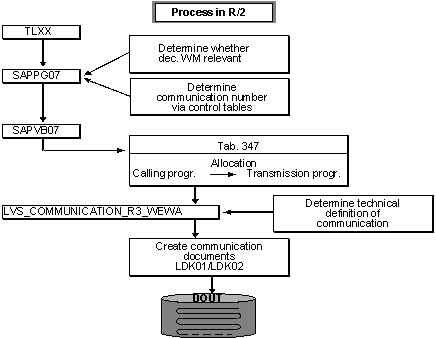
Checking Whether Relevant for Warehouse Management
The system checks the entries in table 340 to determine whether the storage location is linked to an R/3 warehouse number.
Determining the LVS Movement Type
In table 341, the system finds the LVS movement type for the RM reference movement type as well as other information for Warehouse Management (for example, the stock category, the account assignment indicator, the transfer requirement indicator).
Creating the Data Extract
The system creates a data extract LD01 from the data to be transmitted from the GR/GI document. This data extract contains the relevant data from the RM document and data (for example, the special stock number) that is also determined automatically for the R/3 Warehouse Management component.
Determining the Transmission Program
Via table 347 the system processing task calls up the program that creates and transmits the communication document.
Determining the Receiver
Using table 342, the transmission program determines the communication number for the transaction activity key 001 and in table 343 finds the technical definition of the receiver and the type of transmission (automatic/manual).
It is possible to control the determination of the receiver using the movement type. In this way, individual movements can be handled differently. For example, you can have some goods movements (such as goods receipts for purchase orders) transmitted automatically and movements with lower priority transmitted at a later time (manually).
Creating the Communication Document
The transmission program creates the communication document LDK01 from the data extract LD01. Here the fields are converted to R/3 format automatically. The system reads table 344B in order to convert the R/2 account assignment type into the R/3 requirement indicator. The units of measure are decoded based on table 006Z.
Structure of the Communication Document
The communication document consists of records of the record type WM01. The system creates a record for each document item that is relevant for the warehouse. The first record is given the status F (First), and the last record is given the status L (Last). The status field remains blank for records located between the first and last positions in the communication document (see Status of Communication Records under the topic
Record Types.)Transmitting the Communication Document
The communication document is transmitted either automatically or manually to the R/3 System as soon as the driver is activated.
Technical Process in R/3
If a communication document LDK01 is transmitted from the R/2 System to the R/3 System, this initiates the following actions in R/3:
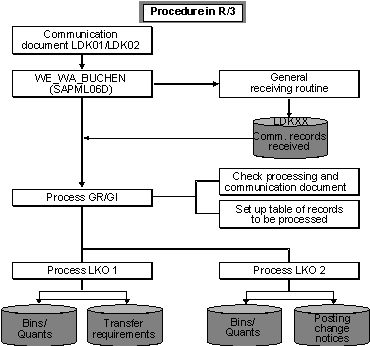
Receiving the Communication Document
The communication document that is created in R/2 when a goods movement takes place is received in the R/3 System by a receiving routine and stored in table LDK01.
Status Record in Table LDK00
At the same time, the system writes a status record into table LDK00 that is used for managing the communication document.
Further Processing:
The individual records of the communication document are processed and checked by a further routine. The postings required for the goods movements are carried out automatically.
If an error occurs during the processing of a communication document, the corresponding communication document is noted in the status table LDK00 and the person responsible for the transaction receives a Mail message pointing out the error. See
Mail Control in the R/3 System.