 Creating the Material Master Record in R/2
Creating the Material Master Record in R/2
The general process for creating or changing a material master record in an R/2 System that is linked to an R/3 Warehouse Management component is as follows:
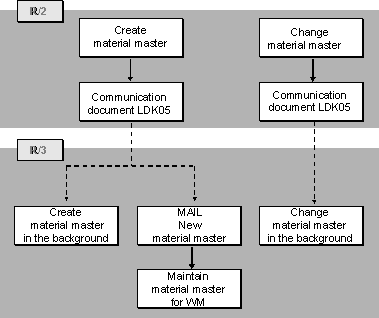
– The system creates a new material master record (in the background) with the following views:
- Engineering/Design
- Storage
– The person responsible for R/3 material master maintenance receives a Mail message that refers to the new material master record. This Mail message can be sent as an "express" message if desired (see
Only the views maintained by the system (engineering and storage data) can be displayed as illustrated below.
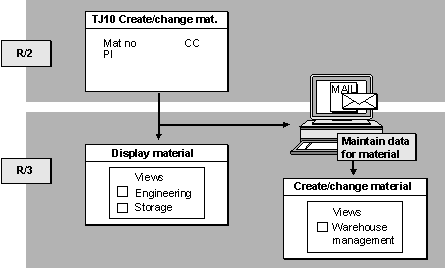
Mail messages can be viewed by choosing Office
® Inbox from the SAP main menu bar.Technical Process in R/2
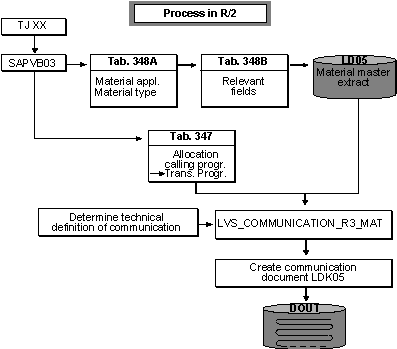
Whenever a material master record is changed or created in the R/2 System, this initiates the following actions in the R/2 System:
Relevant Field Check
Material data maintenance is only relevant for Warehouse Management if a plant segment is created.
Creating a Material Master Record
When you post a new material master record in the system, the data relevant for the warehousing system is downloaded if a plant segment is created as well. If the new material master record is only created at client or company code level, the interface to the R/3 warehouse will not be activated.
If a plant segment is created, the system checks in table 340 whether the plant is linked to an R/3 warehouse number. For each plant and warehouse number in this table, a data record is created.

In plant 01, storage location 88 is linked to an R/3 warehouse number. In plant 02 no storage location is managed by an R/3 system. In the R/2 host system, a user creates the client and company code data for a material as well as the plant data for plant 02. This new material is not relevant for the R/3 Warehouse Management component.
If you now create the plant data for plant 01, a communication process takes place.
Changing a Material Master Record
You always change general material data in the R/2 System.
If you make a change to a relevant field in a material master record in the R/2 System, the system creates a new communication document to be sent to the R/3 System.
Procedure
The procedure is as follows:
Changing Warehouse Management Data
You change Warehouse Management data in the R/3 System. In this case, no communication takes place because only the R/3 material master contains Warehouse Management data.
For information about maintaining the material master in the R/3 System, see
Material Master DataWhen a changed material master record is posted in the system, the system checks the following items, regardless of the segment changed (that is client, company code, or plant):
Storage location 88 in plant 01 is linked to an R/3 warehouse number. Plant segment 01 is not yet maintained for a material. If a user changes the material short text (client level), this change is not relevant for the R/3 Warehouse Management component.
However, if plant segment 01 exists for a material and a user changes the material short text, the change is relevant for Warehouse Management.
Checking Maintained Statuses
If the material master record is relevant for the warehouse, the system checks in table 348A whether all the statuses required for the material category and the material type are maintained. table 348A (illustrated below) lists the views that must be maintained for material types. The maintenance of these views affect the transmission of communication documents to the R/3 system.
Material Application/Type for R/3 WM (Table 348A in R/2)
Mat.app.ty |
Mater.type |
Status: |
P |
R |
P |
S |
D |
W |
A |
Q |
R |
C |
HAWA |
K |
E |
V |
L |
The following statuses, for example, must be maintained for a trading good (material type HAWA) of the chemical industry (material application type C):
Only when all the relevant statuses have been maintained (that is, the views listed in table 348A for the material type) can the material data be transmitted to the R/3 Warehouse Management component without error.
Creating a Data Extract
Via table 348B the system determines the material master fields that are to be downloaded. The system first places these fields as a material master extract into temporary storage in table LD05.
Determining the Transmission Program
Via table 347, the processing task calls up the program that creates the communication document and writes it into the queue.
Determining the Receiver
Via table 342, the transmission program determines the communication number for transaction 003 and then, via table 343, finds the technical definition of the receiving system. table 343 also contains information as to whether the communication document is to be transmitted automatically or manually.
If several R/3 warehouse numbers are linked to the R/2 system, a communication document must be created and transmitted for each R/3 warehouse number.
Creating and Transmitting the Communication Document
The transmission program creates the communication document LDK05 from the material master extract LD05. The fields are converted to R/3 format.
This communication document consists of a record of the record type WM05 and is given the record status S (single) (see Status of Communication Records under the topic
Record Types.)The communication document is first placed into a queue (DOUT). If the transmission is automatic, the document is sent immediately. If you want to start the driver manually, you use the appropriate transaction (see
Queue Management in R/2)
Material data is sent as soon as materials are created for the assigned plant, independent of whether the storage location segments are created or not. If you want to specify which materials are transmitted to the R/3 System, you can copy the transmission program, modify it and enter the information in table 347 instead of using the standard transmission program RLDLVS02.
Technical Process in R/3
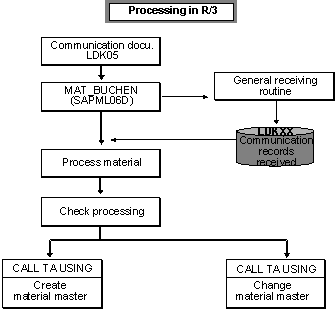
If an LDK05 communication document is downloaded to the R/3 System, this initiates the following actions to change the material master record in R/3:
Receiving the Communication Document
The communication document is received in R/3 by a receiving routine and then stored in table LDK05.
Parallel to this, a status record is written into table LDK00 for managing the communication document.
Further Processing
The communication document is processed and checked by a further routine. The system calls up the transaction for maintaining the material master data via the CALL TRANSACTION. The material master record is created or changed, respectively.
If an error occurs during further processing of the document, this is noted in the status record for error recovery later on. The responsible user receives a Mail message pointing out the error. See
The Analysis Tool and Mail Control in the R/3 System.