Assigning Commitment Items to G/L Accounts
Assigning Commitment Items to G/L Accounts
Use
Having created your commitment item hierarchy, you must then define account assignment items in the G/L accounts, which are relevant to the automatic account assignment derivation from the G/L account.
Prerequisites
A prerequisite is that you have first flagged the Commitment item field as an optional entry in Customizing for Financial Accounting by choosing Define screen format per account group (G/L accounts).
To ensure that data is correctly recorded and that commitment/actual values are correctly analyzed in the information system, it is essential that you define the correct control parameters for account assignment items in G/L accounts. If you do not, the values may be wrongly posted and displayed.
Activities
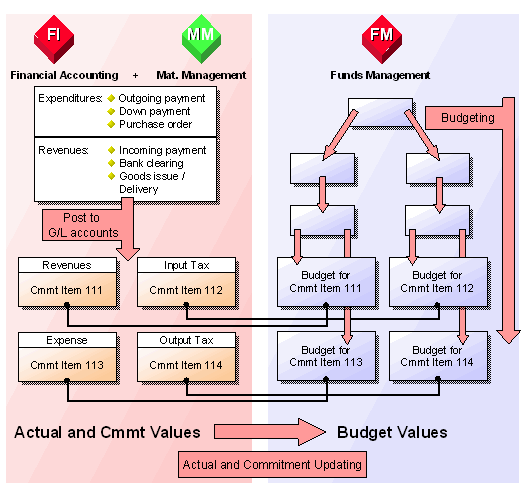
If you post to a particular G/L account, the posting is simultaneously recorded in the commitment item stored in it. The control parameters determine how and where the values are recorded in Funds Management.
The following diagram illustrates how recording works and how the actual and budget values are compared with one another in Funds Management:
When you enter a posting, the system proposes the commitment item from the G/L account for that line item. In accordance with the settings entered in Customizing, this recommendation value can be transferred or overwritten with another commitment item.
The financial transaction and item category are automatically taken over from the line item when you post.
The table below shows some examples of G/L accounts and the control parameters which you must define in the relevant account assignment items. See:
Examples: Assigning Commitment Items to G/L Accounts
If you have not defined a commitment item in the G/L account and do not make a manual entry either, and Controlling is active, and you have assigned the commitment items to cost elements, postings are made to the commitment item in accordance with this assignment. For more information, read
FM Account Assignment Logic.