Configuration Management (LO-CM)
Configuration Management (LO-CM)
Purpose
During their life, products and projects go through various
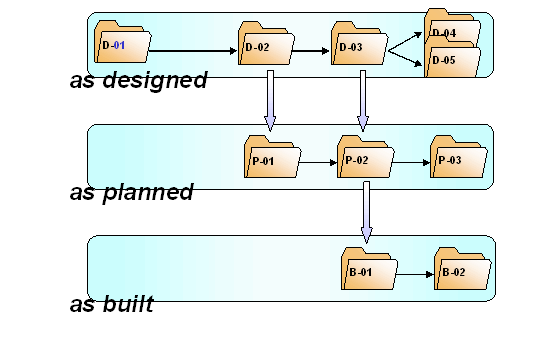
Life cycle phases such as engineering/design, sales, production and maintenance. In each life cycle phase, a product has different configurations. A configuration is made up of multiple different objects that describe the product in the relevant life cycle phase. For example, these can be documents, materials, BOMs or other objects. The cumulation of objects changes over the course of time and is different from life cycle phase to life cycle phase.With Configuration Management you identify the objects that describe a product in a particular life cycle phase and cumulate them in a metaobject – a
configuration folder. With the help of different configuration folders in various life cycle phases you manage the configuration of products and projects over different life cycle phases.Configuration Folders in Three Different Life Cycle Phases
Configuration Management can be used in various business processes:
The features offered in Release 4.6C support the Collaborative Engineering & Project Management processes.
Extensive documentation on this can be found in the SAP library under Logistics ® PS – Project system ®
 Collaborative Engineering & Project Management (CEP).
When your product reaches a milestone, you freeze the processing status for a specific point in time in a
Information on Baselining can be found in this documentation under
Creating a Baseline.Integration
These components are integrated with Configuration Management:
Features
In a company the various products go through different life cycle phases. You can personally define the individual life cycle phases for your products and projects in Customizing Configuration Management and flexibly combine them with one another in order to meet your company’s requirements.
With accompanying documents, you can comprehensively document the processing processes of a configuration folder. Accompanying documents connected to the document management system (CA-DMS) via an object link and are managed with their functions.
From a worklist, you always have fast access to the configuration folders that you work with.
See:
WorklistSee:
Status management in Configuration ManagementWith the product structure browser and the project structure browser, you look for objects that are relevant for a configuration and copy them, using Drag & Drop, into your configuration folders.
If you create a Baseline, the system automatically looks for objects that are relevant for the product and adds them to the Baseline.
See:
Automatic completion of the structureYou can compare the hierarchically structured object lists of several configuration folders or Baselines with each other.
This function supports the transition from the production to maintenance phase. An As-Built configuration is an installation that you automatically generate from the system with the help of existing production data (process and production orders). This operation can be integrated in the confirmation of a production order. You can transfer such an installation into a configuration folder.
See:
As-Built configuration (ABC)